
Updated November 1, 2026
Exact, smart and similarity matching, all free
Remove duplicates from CSV and Excel files
Upload a spreadsheet. Pick the columns to match on. Operelio finds and removes every duplicate row, with a preview before you commit, so the file is clean before your CRM import.
No credit card required. Free for up to 2,000 rows.
What it does
Six things this tool does well
Column-based matching
Pick one column, several, or the whole row, and match exactly, smartly or by similarity. Match on email alone, or combine email and company for stricter matching.
Keep first or last
Choose which occurrence to keep when duplicates are found. Keep first is the default. Keep last is useful when later rows have more recent data.
Preview before you run
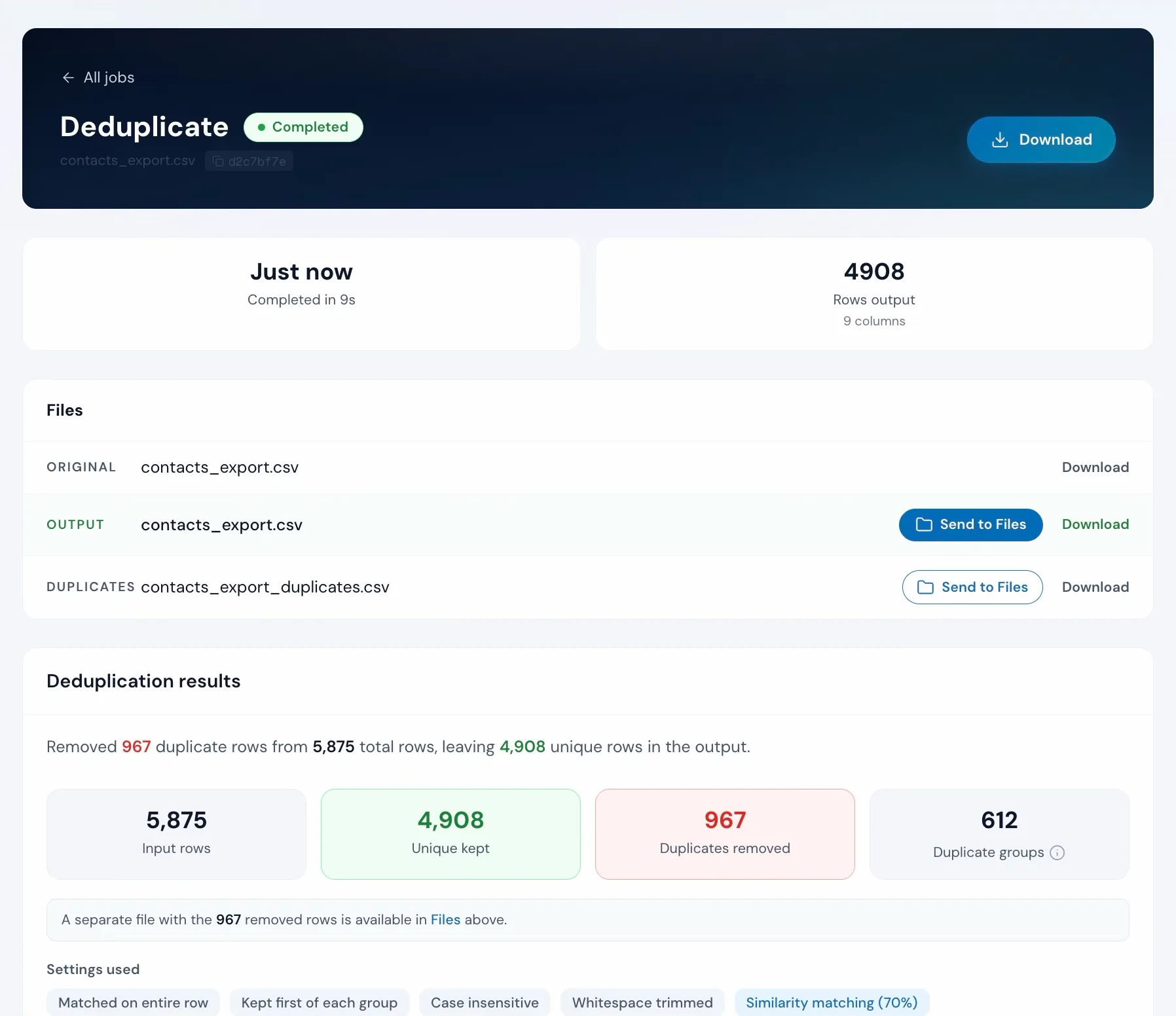
See how many duplicates were found and which rows will be removed before you commit. Nothing changes until you click Remove duplicates.
Smart matching
Emails, phone numbers and company names that mean the same thing count as the same: john.doe+shop@gmail.com and johndoe@gmail.com, +1 (415) 555-0123 and 415-555-0123, Westmarch Trading and Westmarch Trading Ltd. Pick Smart under How to match and it reads each column's type.
Similarity matching
Exact matching misses close duplicates like "Jon Smith" and "John Smith". Similarity matching catches typos and small differences by comparing how similar the values are, with a threshold you set.
Export removed rows
Download a separate file containing just the rows that were removed. Useful for reviewing what was dropped before you import the clean file.
How to use it
Three steps from messy to clean
Upload your file
Drag and drop any CSV or Excel file. Operelio reads the columns for you.
contacts_export.csv
5,875 rows, 9 columns
Pick columns and preferences
Select which columns to match on and whether to keep the first or last occurrence.
Match on
Keep
Download the clean file
Click Remove duplicates and download your file with all duplicates removed. See the summary: rows checked, duplicates found, rows kept.
Doing it yourself
How to remove duplicates from a list
In Excel, select the list and choose Data, then Remove Duplicates. In Google Sheets, choose Data, then Data cleanup, then Remove duplicates. Both match values that are identical apart from letter case, and delete the rows straight away.
Step by step: remove duplicates in Excel and remove duplicates in Google Sheets.
In Excel or Google Sheets
No preview before deletion. No similarity matching. No record of what was removed. Issues only surface when the CRM import fails.
With Deduplicate
Preview before you run. Similarity matching included. Export removed rows to verify what was dropped.
Duplicates might not be the only problem in that file
Removing duplicate contacts before a CRM import? See how to remove duplicate contacts before import.
Upload it and Bridgeant reviews the file before you commit to a tool. It reports what it finds, orders the problems by how much they actually matter, and points you at the tool for each one. That is on every plan including Free, and it works from a summary of your file rather than the contents.
On Starter and up it stops advising and starts doing. Describe the job in a sentence and Bridgeant plans the steps, shows you the plan, and runs them in the right order once you approve. You are not running four jobs by hand and trying to remember which came first.
Bridgeant, the agent inside OperelioPricing
On every plan.
The whole tool is on every plan: exact, smart and similarity matching, the blank-email guard, and the separate file of removed rows. Row limits: 2,000 on Free, 50,000 on Starter, 75,000 on Pro, 150,000 on Agency. Each run uses one job: 5 a month on Free, 300 on Starter, 1,000 on Pro, 3,000 on Agency. Starter from $29.25 a month, Pro from $74.25, Agency from $224.25, billed annually.
It can be a step on a trail on any plan. From Starter, it runs on its own on every file or lead that reaches the trail's folder, with the push into your CRM at the end.
Common questions
FAQ
How does Operelio detect duplicates?
You select one or more columns and Operelio compares every row on those columns, in one of three ways. Exact: the same value, ignoring capitals and spaces at the ends unless you turn that off. Smart: emails, phone numbers and company names that mean the same thing. Similarity: typos and small differences, above a threshold you set. Rows that match are duplicates and the first occurrence is kept by default. A blank or unreadable email never counts as a match, so two rows with no email are not the same person.
What is smart matching?
Smart matching reads what kind of column it is and compares the meaning, not the letters. Gmail addresses match with dots and plus tags ignored, phone numbers match whatever the punctuation and with a US or UK country code dropped, and company names match with suffixes like Ltd, Inc and GmbH stripped. It runs on every plan.
What is similarity matching?
Similarity matching finds close duplicates by comparing how similar values are, above a threshold you set. It catches typos and variations like "Jon Smith" vs "John Smith" that neither exact nor smart matching would. It runs on every plan.
What file formats are supported?
CSV (.csv) and Excel (.xlsx, .xls). Upload either format and download a clean file with duplicates removed.
Does it work with multi-tab workbooks?
Yes. By default the tool reads the workbook's first tab, and a Sheet picker next to the file name switches to any other. To remove duplicates across every tab at once, combine the tabs into one list in Merge Files first (its Source Tab column keeps track of where each row came from), dedupe the combined list, then split it back into tabs if you want the original shape back.
What does the Free plan include?
5 jobs per month, files up to 2,000 rows and 2 MB, CSV or Excel output, and 24-hour file retention. Every part of Deduplicate is included: exact, smart and similarity matching, the blank-email guard and the duplicates file.
Can I export the removed duplicates?
Yes. Download a separate file with just the rows that were removed, so you can review what was dropped.
How does this compare to a dedicated deduplication tool?
Tools like Dedupely merge duplicate records that are already inside HubSpot, Salesforce or Pipedrive. Operelio removes them from the file before they get there, so they never become records with owners and activity attached. They solve different halves of the same problem and work well together.
Can I match on more than one column?
Yes. Select multiple columns and rows are only flagged as duplicates if they match on all of them. Useful for stricter matching, like email plus company name.
Works well with
Want the full walkthrough? Read the Deduplicate guide →
Related reading: Remove duplicates in Excel · CRM data cleanup · Duplicate contacts in HubSpot · How similarity matching works · Operelio vs Dedupely
Try it on your messiest CSV
Upload a file. We'll do the rest. On every plan.