Two-stage check · Credits included on every paid plan

Verify every email before it reaches your CRM

Upload your list. Operelio checks every address, flags the bounces, disposable inboxes, role accounts, and catch-all domains, rebuilds the ones that are missing or bounce, and gives you a clean file your sending tool will trust.

Pro from $39 a month. 1,000 verify credits included.

A completed email verification in Operelio: 3,228 of 5,875 addresses safe to send, with 1,964 undeliverable caught before sending.

What it does

Catch every bounce before the campaign goes out

What we check

Bounces

Addresses that don't exist, mailboxes that are full, and domains that don't accept mail. The ones that hurt your sender score the most.

Disposable inboxes

Throwaway domains like mailinator, guerrillamail, and 10minutemail. Useful for trial signups, useless for a sales conversation. Caught by a free check, so in Full verification they're skipped before you spend a credit.

Missing mail server

Domains with no mail server set up can't receive mail at all. Operelio checks for one as a free pre-check, before any paid call, and flags the result in its own column.

Role accounts

Generic inboxes like info@, sales@, and support@. Often a distribution list with no owner. Flagged separately so you can decide whether to send.

Catch-all domains

Domains that accept mail at any address whether the mailbox exists or not. Common on B2B lists. Escalated to a second, deeper check.

Format errors

Missing @, spaces, broken character encodings, and other malformed addresses. Caught before any provider call so you don't burn a credit on them.

Risky and unknown

Addresses where the receiving server returns an ambiguous response. Flagged as risky with a confidence score so you can hold them or send carefully.

What you get back

A clear verdict on every row

One of seven statuses: valid, risky, invalid, disposable, role, catch-all, or unknown. No guessing about what to do next.

A 0 to 100 confidence score

Not just a binary verdict. Borderline addresses get a score so you can set your own threshold. Send to anything above 80, hold the rest for review.

A reason code, not just a label

Each row carries a short code like low_quality, catch_all, role_account, or disposable so you can sort and filter the file in Excel without opening the tool again.

A recommended action on every row

Send, review, or exclude. A plain categorical call derived from the verdict and the free checks, so you can filter the file down to just the rows worth sending without reading every status. It's a label, not a hidden score.

The signals behind the verdict

Extra columns for context: whether the domain has a mail server, whether the address is business, freemail, role, or disposable, and a likely-typo suggestion when there is one. Each is an observation about the address you uploaded.

A pattern-fit check against the same domain

When several addresses on one domain are in your file, Operelio notes whether each one matches the dominant pattern for that domain and flags the odd one out. It reads the addresses you gave it. It never invents one.

Recovered addresses for the rows that came up empty

For rows with no email or one that bounced, one click rebuilds a likely address from the person's name and the pattern Operelio learns from confirmed addresses at the same company, checks it, and merges it back in. It never invents a person.

A send-readiness score and a one-slider export

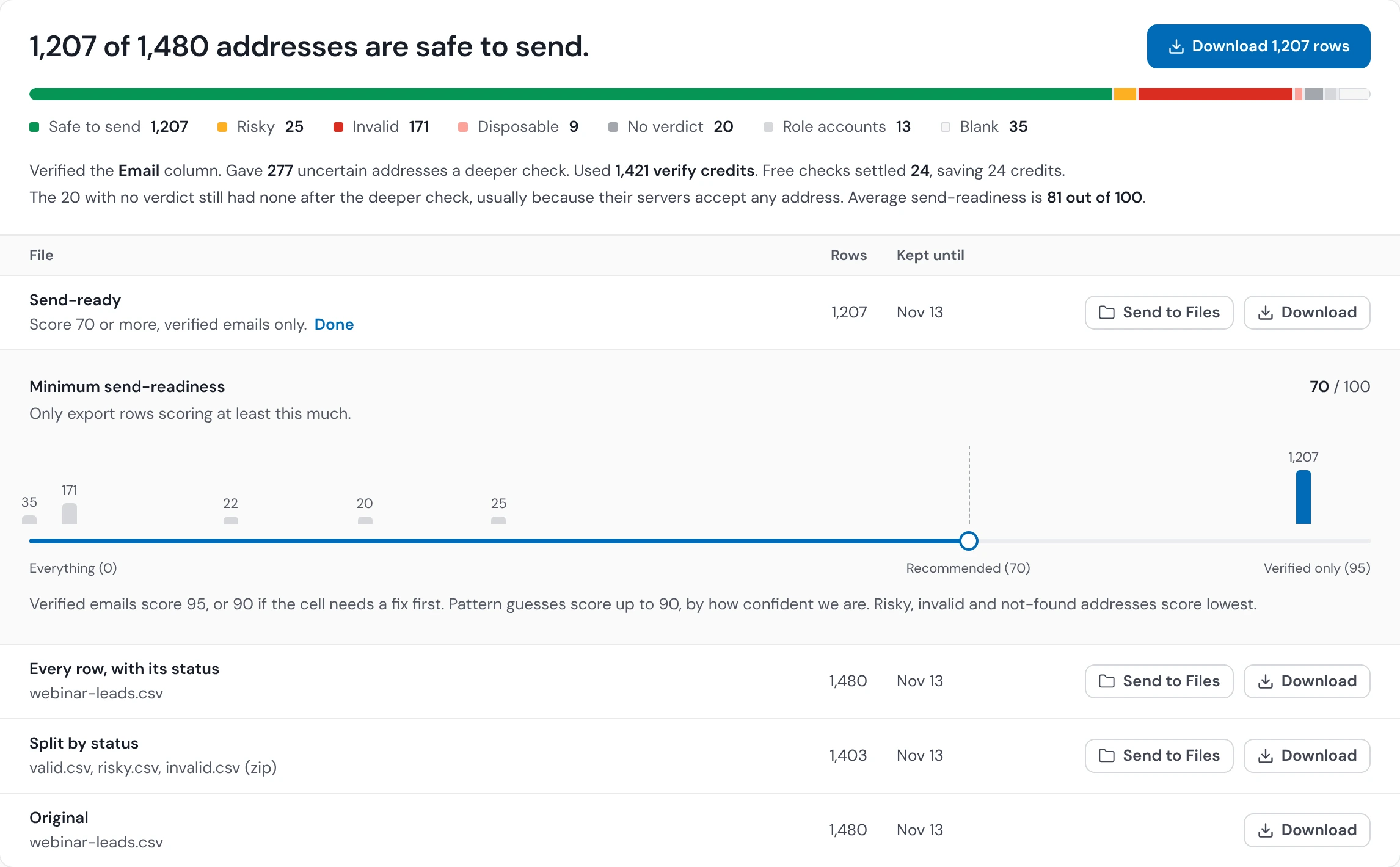
Every row gets a send-readiness score from 0 to 100. A confirmed verification scores highest; a rebuilt address is capped below the verified floor, because a good guess is still a guess. Drag one slider and export just those rows.

Split files for clean handoff

Download a single enriched file, or one click to split into valid.csv, risky.csv, and invalid.csv zipped together. Send the valid list to your campaign, hold the risky list, throw away the invalid.

Checks that sharpen on your own results

After you send, upload what delivered and what bounced. Operelio uses your workspace's own history to score future catch-all guesses on those domains more cautiously. It tunes the probabilistic guesses, never a confirmed verdict, and your send results are never pooled with anyone else's.

How you pay

Credits included on every paid plan

Pro includes 1,000 verify credits each month. Team includes 4,000 shared across the workspace. Agency includes 12,000 shared. Unused credits roll over to your next cycle, up to 3x your monthly amount, and refresh on your billing anniversary rather than the calendar month.

Top up with packs that don't expire

Out of credits mid-list? Buy a pack: 2,500 for $30, 10,000 for $100, 50,000 for $400. Packs never expire. Or add one as a recurring top-up that renews for less than the one-time price. New workspaces can buy up to 10,000 verify credits per cycle; every pack size opens up once the workspace is 30 days old with a settled payment.

Unknowns are free

When the receiving server won't say either way, you're not charged for that row. Real cost per resolved verdict is lower than the headline rate.

Pre-flight cost estimate

Before you run the job, Operelio shows the most it can cost and what's left in your balance. We hold that amount while the job runs and charge only what it actually used, so unknowns and skipped rows come back to you. If a job fails, you pay nothing.

Two ways to run

Screen a list for free, or verify every address when it counts

Full verification

Pro and up · the complete check

The full check, in order. Free signal checks run first and skip provable junk, so broken syntax, dead domains, and disposable addresses never cost a credit. Then every deliverable address is verified, the uncertain ones (risky, unknown, catch-all) get a deeper second check, and the Finder rebuilds addresses that are missing or bounce. You get a confirmed verdict on every row.

One credit per row

A row costs the same one credit whether it passes the first check, escalates to the deeper one, or gets rebuilt by the Finder. The pre-flight estimate shows the cost before you commit, and the free checks lower it by skipping the junk.

Quick clean

Free · every plan

The free signal checks only. Operelio removes addresses that can't receive mail, broken syntax and dead domains, and flags disposable and role accounts. It does not confirm whether a real-looking address exists, so those come back marked "unverified". No paid verification, no deeper check, no Finder, zero credits. Use it to screen a list before you decide what to verify.

Zero credits, on every plan

Available on Free, Pro, Team, and Agency. It screens the list for free; to confirm the real-looking addresses, run Full verification.

Either way, the free checks never change your addresses. A likely typo is surfaced as a suggestion in its own column, never written over what you uploaded.

How to use it

Upload, verify, ship

1

Upload your file

Drop in a CSV or Excel file. Operelio detects the email column automatically. If you have more than one email column, you pick which one to check.

contacts_export.csv

5,875 rows · Work Email column detected

2

Run the job

See the credit cost before you commit and the balance you'll have left. Click Run and the job kicks off. Most files finish in a few minutes; lists with a lot of catch-all addresses take longer.

Estimated cost5,875 credits
Balance after4,125 credits left
3

Download or split

Get the enriched file with status, score, and reason on every row. Or split into valid, risky, and invalid CSVs. Push the valid rows straight to HubSpot, Salesforce, or Pipedrive through CRM Formatter.

3,228 valid · ready to send

76 risky on hold · 1,964 undeliverable dropped

The alternative

Sending without verifying

This is what shipping an unverified list costs you.

Send to a raw list

1Sender score drops as bounces stack up
2Inbox-provider reputation suffers across every campaign that follows, not just this one
3Your campaign tool throttles or pauses the send mid-batch
4Replies drop because legitimate emails land in spam folders
5You waste credits on a sending tool for addresses that never had a chance

Weeks of recovery

Once your sender reputation drops, climbing back is slow. Prevention costs less than recovery, every time.

Verify with Operelio first

1Upload the file. Operelio detects the email column and shows you the credit cost before you commit
2Every row gets a verdict, a 0 to 100 confidence score, and a reason code you can sort and filter on
3Blank cells, malformed addresses and dead domains are screened out before any check runs, so they never touch your balance
4Split the file into valid, risky, and invalid in one click
5Send the valid list straight to your CRM through CRM Formatter

Minutes, not weeks

Most files finish in a few minutes. Send to a clean list and your sender score stays where you put it.

Privacy and compliance

Your list stays your list

No resale, no enrichment swaps

Operelio verifies the addresses you upload. We don't sell access to your list and we don't enrich third-party data from it. We do reuse verdicts: if an address was checked anywhere on Operelio in the last 7 days, we serve that stored verdict, matched on a one-way hash that carries no name, file, or account. Your list itself is never shared. When you upload your send results, those outcomes sharpen your own workspace's future checks and nobody else's. Nothing is modelled or learned across customers — the scoring is rule-based, not trained on anyone's data.

Short retention by default

Uploads sit for the standard file-retention window on your plan (30 days on Pro and Team, 90 days on Agency), then they're deleted. You can delete a file from your history at any time.

Lawful basis covered

Verification is a legitimate-interest processing activity under GDPR and equivalent regimes. On a paid plan you can also tick a box to remove contacts on your Do Not Contact list from the verified results. See the security page for the full position.

Pricing

Credits included on every paid plan

Pro ($39 a month) includes 1,000 verify credits. Team ($99 a month) includes 4,000 shared across the workspace. Agency ($299 a month) includes 12,000 shared. Unused credits roll over to your next cycle, up to 3x your monthly amount. Need more? Top up with a pack: 2,500 for $30, 10,000 for $100, 50,000 for $400. Packs never expire, and you can add one as a recurring top-up for less than the one-time price. New workspaces can buy up to 10,000 verify credits per cycle; every pack size opens up once the workspace is 30 days old with a settled payment.

Common questions

Email Verifier & Finder FAQ

How accurate is the verification?

Operelio uses a two-stage check. The first stage handles the bulk of your list at high speed. Risky and catch-all addresses escalate to a second, deeper check that runs extended validation against the receiving server. Most single-check tools return a shrug on those, and the escalation is what turns them into a usable answer. Your own accuracy is measured on the Analytics tab: of the addresses Operelio called valid or recovered, how many actually bounced.

What's the difference between Quick clean and Full verification?

Quick clean is free and available on every plan, including Free. It runs the free signal checks only: it removes addresses that can't receive mail (broken syntax, no mail server) and flags disposable and role accounts. It does not confirm whether a real-looking address actually exists, so those come back marked "unverified". It costs zero credits. Full verification, on Pro and up, is the complete check. The free signal checks run first and skip provable junk for free, then every deliverable address is verified, the uncertain ones (risky, unknown, catch-all) get a deeper second check, and the Finder can rebuild addresses that are missing or bounce. Full verification costs verify credits, one per row whatever happens to it. Use Quick clean to screen a list for free, and Full verification when you need a confirmed verdict on every address.

What's a catch-all address and why does it matter?

A catch-all domain accepts mail at any address whether the mailbox exists or not. They are common on B2B lists. Most simple checks return "unknown" on these and you're left guessing. Operelio escalates catch-all addresses to a second, deeper check, then flags them with a confidence score so you can make the call rather than getting a shrug. It never labels a catch-all "verified". And when the Finder rebuilds a missing or failed address that lands on a catch-all domain, it scores that address with plain-language evidence behind the number, for example "matches company pattern" or "name match".

How long does a verify job take?

Most files finish in a few minutes. Bigger lists take longer, and so do lists with a lot of catch-all or risky addresses that need the deeper second check, because those run in stages and each stage waits its turn behind other jobs. You don't have to wait on the page. The job lands in your notifications when it's done. Verification runs up to your plan's daily limit: 2,500 rows a day on Pro, 8,000 on Team, and 25,000 on Agency.

How am I billed?

Verification uses credits. Pro includes 1,000 verify credits each month, Team includes 4,000 shared across the workspace, and Agency includes 12,000 shared. Beyond the included quota, you buy a pack: 2,500 credits for $30, 10,000 for $100, 50,000 for $400. Packs never expire. You can also add a pack as a recurring top-up, billed monthly on its own date, which costs less than buying the same pack one-time. Verifications that can't return a definitive result (true unknowns where the server won't say) aren't counted against your balance.

Can I upload addresses I scraped from the web?

Yes, the tool will verify any list you upload. You're responsible for making sure you have a lawful basis to contact the people on it under GDPR and equivalent regimes. Verification is a quality check, not a consent check. Worth knowing: scraped lists usually have high bounce rates, and verification will tell you the size of that problem but it won't fix it.

What does the output file look like?

Your original file with new columns added at the right. The verdict columns are email_status (one of valid, risky, invalid, disposable, role, catch-all, or unknown), email_score (a 0 to 100 confidence number, populated for every checked row), email_provider (which check produced the verdict, either verification for the first pass or deep check for the second), email_reason (a short code like low_quality, catch_all, or role_account), and email_rechecked (yes when the deeper second check looked at that row). Then come the context columns: email_mx (yes, no, or unknown for whether the domain has a mail server), email_type (business, freemail, role, or disposable), email_typo_suggestion (a likely-correct domain when the one you entered looks like a typo, left blank otherwise, and only ever a suggestion), and email_recommended_action (send, review, or exclude). You can sort and filter the file on any of these.

Can I get just the valid emails?

Yes, two ways. Drag the send-readiness slider in the Download panel to the confidence line you want and export just the rows above it. Or use the Split by status download, which gives you three CSVs (valid.csv, risky.csv, invalid.csv) zipped together: send the valid list to your campaign tool, hold the risky list for a manual review, and throw away the invalid list. You can also push the valid rows straight to HubSpot, Salesforce, or Pipedrive through Operelio's CRM Formatter.

Is my list private?

Operelio verifies each email and stores the verdict, the confidence score, and a one-way hash of the address for 7 days, so a recent verdict can be reused instead of re-checking the same address. That hash can't be turned back into an address, and it carries nothing about you or your file. The raw address is held only for the standard file-retention window on your plan (30 days on Pro and Team, 90 days on Agency), then deleted. We don't sell or resell your list, and your list itself is never shared with another customer. See the security page for the full details.

What happens after verification?

You can download the enriched file, split it into valid, risky, and invalid CSVs, or send the valid rows straight into CRM Formatter for direct push to HubSpot, Salesforce, or Pipedrive. You can also chain the Email Verifier & Finder into a saved workflow that runs every time a new list lands.

Does Operelio get more accurate over time?

For your account, yes. After a send, upload the results (which addresses delivered and which bounced) on that job's page. Operelio records the outcome for each address and uses your workspace's own bounce history to score future catch-all guesses on those domains more cautiously. A generic verifier checks an address in isolation and never learns what happened after you hit send. Operelio can, because you tell it. Two things stay true: it only tunes the probabilistic catch-all guesses, never a confirmed verification, and the learning is per-workspace. Your send results never get pooled with other customers, and there is no shared cross-customer model. You can also turn the calibration off per workspace in Team settings while still keeping the bounce analytics.

Where do I see how accurate my checks turned out to be?

Under Analytics & History, the Analytics tab shows your delivered, bounced, and complaint totals, your bounce rate over time, where bounces concentrate by domain, and the one that matters most: of the addresses Operelio called valid or recovered, how many actually bounced. It's a running scorecard on the tool against your own real sends. Available to whoever you give the bounce-upload permission to.

Want the full walkthrough? Read the Operelio guides →

Stop sending to bounces.

Upload your list, see what's worth sending to, and ship a clean file to your CRM. Email Verifier & Finder is on every paid plan.