
CRM data cleansing for HubSpot and Salesforce
Clean CRM data your team can trust
Fix the names, phones, countries and empty placeholders in every list, so your reports count right, your emails greet people properly and your reps can trust what they see.
| Name | Phone | Country | |
|---|---|---|---|
| Maya Chen | maya.chen@harbourlinehq.example | +442079460958 | United Kingdom |
| Priya Nair | priya.nair@lumenfield.example | +16175550110 | United States |
| Events Team | info@coppergate.example | 2125550100 | United States |
| Raj Mehta | raj.mehta@coppergate.example | 2125550187 | United States |
| Lucia Ferrer | lucia.ferrer@alderpointhq.example | +34612345678 | Spain |
Where messy CRM data comes from
Event and webinar lists
People type their own details, so names arrive in lowercase, countries three ways and “N/A” in the company field.
Exports from another tool
An old CRM or a marketing tool has its own column names and formats, so phones and dates don't match yours.
Reps typing by hand
One writes “USA”, another “United States”, and a third leaves it blank.
Partner and bought lists
Each source has its own column names, spellings and placeholders, so the same field arrives a different way from every partner.
Years of imports
Each one added a little mess, so the CRM you have now holds every format at once.
What clean CRM data gives your team
Reports that count every country once
When UK, GB and England are three countries, territory sizes, campaign targets and the report you take to the board are all wrong, and nobody trusts the dashboard.
HowTurn on country cleanup, and more than 80 countries are written one way, so a report counts each country once. Data Health Check's fixes do the same without the switch.

Emails that greet people properly
“Hi maya” at the top of an email tells the reader they're on a list, and the email reads like every other mass send.
HowLowercase names are capitalized and split into first and last, and emails are lowercased and trimmed.

Phone numbers in one format
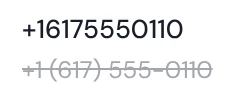
A list with (617) 555-0110, 617.555.0110 and +1 617 555 0110 is hard to search, sort and dial, and reps end up copying numbers by hand.
HowEach phone keeps only its digits and a leading +, a 00 prefix becomes +, and an extension at the end is dropped.
No N/A, TBD or stray spaces in your fields
A placeholder shows up as a real value in your reports and your merge fields, and a trailing space makes “Coppergate” and “Coppergate ” two companies.
HowData Health Check's fixes clear placeholders, trim spaces, repair broken characters, and standardize dates and state names.

Know how clean a list is before it's in your CRM
Once a bad list is imported, fixing it means editing records one by one.
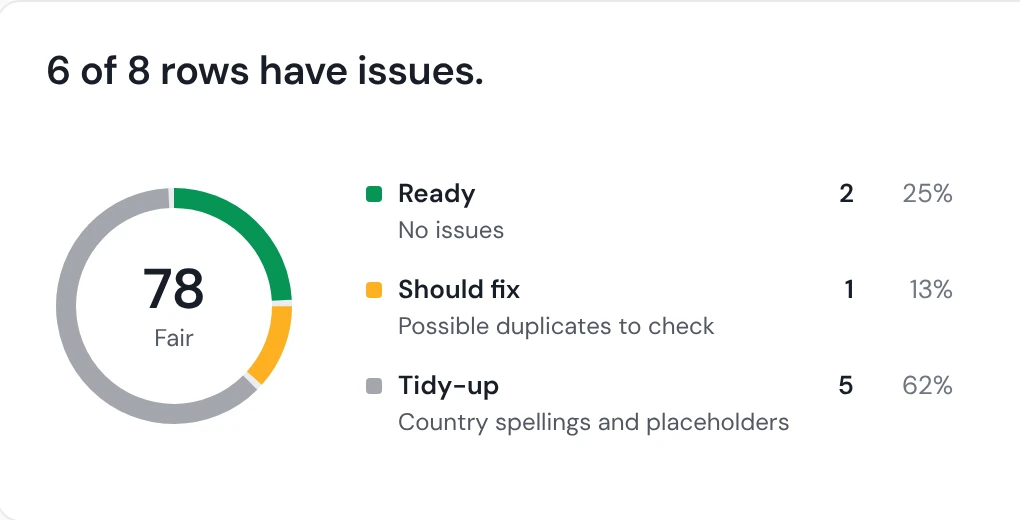
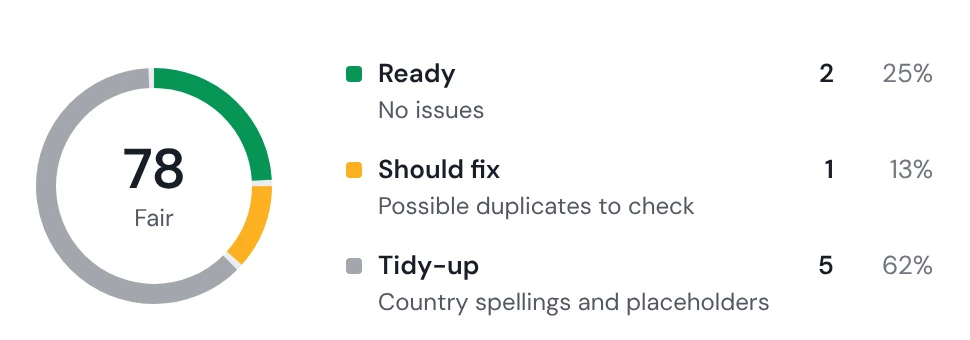
HowData Health Check scores a file from 0 to 100 and lists what to fix first. 80 or more is ready to import, and the check never changes your file.
Fix the data already in your CRM
Years of imports leave mixed formats in the CRM you already have, and nobody has time to edit records by hand.
HowExport from HubSpot or Salesforce just before you clean, clean the file, and push it back with overwrite on, so the cleaned values replace the old ones. On Salesforce, an overwrite also clears a field where your cell is blank.
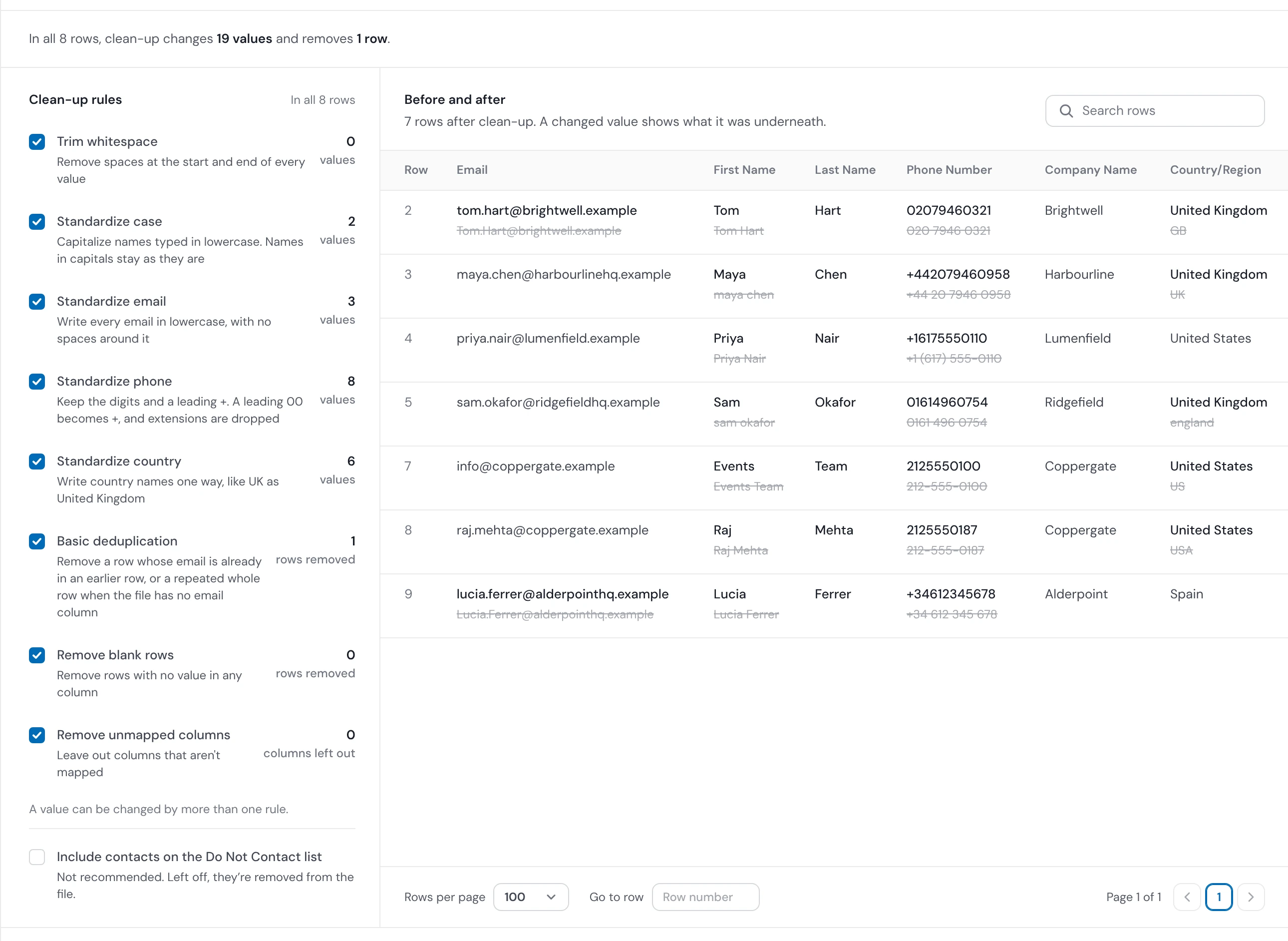
The real review of this list: every change shown before anything is pushed.
Nothing reaches your CRM by surprise
Nothing is sent until you confirm
The report shows what's new, what's updated and what won't be sent first.
Your CRM's values are kept
By default an update only fills blank fields, and overwrite is your choice, on each push or once on a trail, the steps Operelio runs on every file from a source.
The check never touches your file
Data Health Check reports and suggests, and a cleaned copy is a new file.
Every row your CRM won't take is named
Before a push, each value your CRM won't accept is listed with a row count and an example, and those rows are counted as not sent, each with its reason.
HubSpot and Salesforce data cleansing

HubSpot
Contacts and companies. People are matched on email, companies on website or name. A match is updated, filling blank fields by default, and the rest are created.

Salesforce
Leads, contacts and accounts, with each contact linked to its account. With overwrite on, a blank cell clears that field.

Pipedrive
People and organizations. Your value becomes the primary email or phone, and the others keep their labels.
CRM data cleansing questions
What is CRM data cleansing?
Fixing CRM records so each one is complete, in one format and listed once: duplicates removed, bad emails dropped, and values like phones and countries written the same way. Operelio does it to each list before it reaches your CRM.
Can it clean the records already in my CRM?
Yes, through your CRM's export. Export the records, clean the file in Operelio, and push it back with overwrite on. Operelio doesn't read records out of your CRM itself.
Does it merge duplicates inside HubSpot or Salesforce?
No, it removes them from the file. See duplicate contacts.
Which formats does it fix?
Emails, phones, names and countries in the CRM Formatter, and dates and state names in Data Health Check's fixes. Job titles aren't rewritten.
Will a push write over data in my CRM?
Not by default: an update fills blank fields only. Overwrite is your choice, and on Salesforce it also clears a field where your cell is blank.
Should I clean data in my CRM or before I import it?
Both have a place. Cleaning a list before import keeps bad values out. For records already in your CRM, export them, clean the file and push it back. Operelio works on files, so it doesn't merge records inside your CRM. See cleaning data before or after a CRM import.
What happens to rows my CRM won't accept?
Before a push, the report lists each value your CRM won't take, such as a picklist value it doesn't have, text that's too long, or a field your account doesn't have or you can't write to, with a row count and an example. Those rows are counted as not sent, each with its reason.
Is it free?
Data Health Check and its fixes, Clean Headers, Deduplicate and Quick clean, the free email screen that verifies no address, are free on every plan, on files up to 2,000 rows. Pushing to your CRM, Do Not Contact screening and Full verification, a paid check of each address, start on Starter.
Check your next list for free
Data Health Check and its fixes are free on files up to 2,000 rows. Pushing to HubSpot, Salesforce or Pipedrive starts on Starter at $39 a month.