
Automate data entry into HubSpot, Salesforce and Pipedrive
Stop typing forms into your CRM. Filled PDF and Word forms become records in HubSpot, Salesforce or Pipedrive, cleaned the same way every time, and incomplete ones stop for a look first.
 The documentsFilled PDF and Word forms
40forms this week
typed in by hand, one at a time
- No typing
- Same cleanup every time
- Hands off once trusted
- Incomplete ones stop
- Traced to its file
- Your CRM's own fields
 The CRM recordsContacts in Salesforce
37contacts in Salesforce
none typed by hand
- 37 cleaned the same way
- 3 stopped for a look
- 37 traced to their form
One of them: Marcus Romero
- Name
- Marcus Romero
- marcus.romero@
redwater-engineering.example - Account Name
- Redwater Engineering
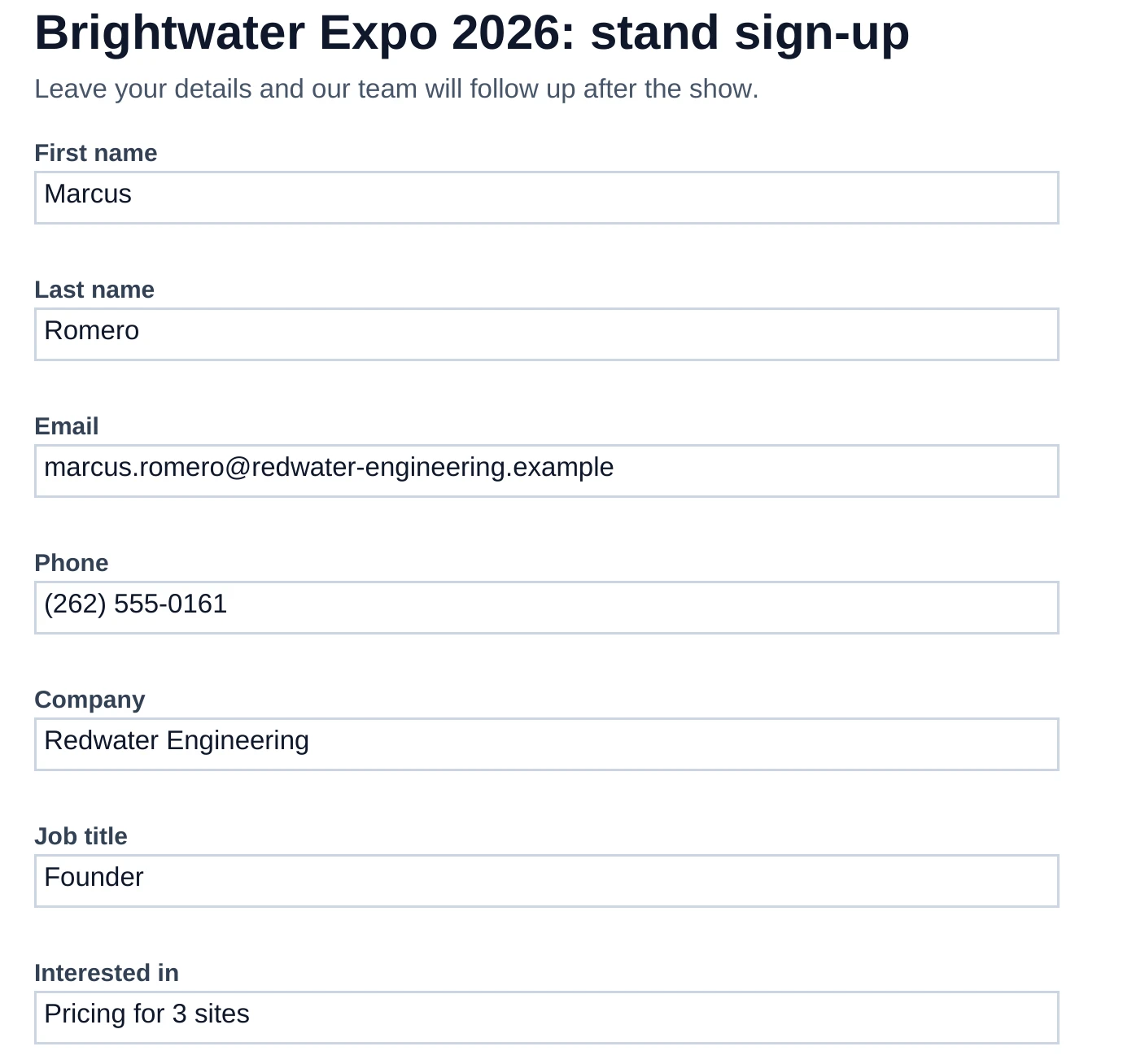
PDF formAs filled inSalesforceAs it landed- First name
- Marcus
- First Name
- Marcus
- Last name
- Romero
- Last Name
- Romero
- marcus.romero@
redwater-engineering.example - marcus.romero@
redwater-engineering.example - Phone
- (262) 555-0161
- Phone
- 2625550161
- Company
- Redwater Engineering
- Account Name
- Redwater Engineering
- Job title
- Founder
- Title
- Founder
- Interested in
- Pricing for 3 sites
- Description
- Pricing for 3 sites
The files someone types in today
Signed forms
A customer or event form, filled in as a PDF.
Word forms
An application or enquiry written up in Word.
Booking confirmations
A PDF per booking, with the guest's details on it.
Order and sign-up tables
A PDF with a table of names and emails.
Application packs
A Word document laid out as questions and answers.
What no more typing gives your team
PDF and Word forms become CRM records with no typing
An hour copying fields from forms is an hour of typos, and it usually falls to someone who should be selling.
HowEmail a PDF or Word (.docx) file to a folder's address. A table becomes rows. A filled PDF form, or a Word form laid out as a table or as "Field: value" lines, becomes one row. Anything else becomes one row with its text in Notes.
- Contact in Salesforce
- First Name
- Marcus
- Last Name
- Romero
- marcus.romero@
redwater-engineering.example - Account Name
- Redwater Engineering
The same cleanup every time, without anyone doing it
A cleanup that depends on who's in that week comes out different every week.
HowA trail runs your steps on every document its folder receives, usually within about ten minutes of it arriving, or on a schedule you set, as often as every 6 hours. Trails run on their own from Starter.
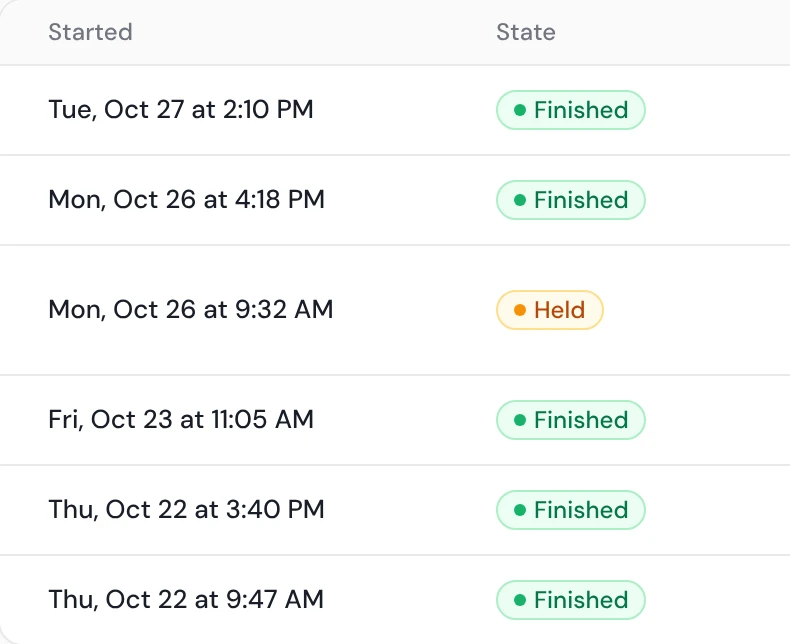
Hands off once you trust it
Approving the same clean file every Monday is still a job.
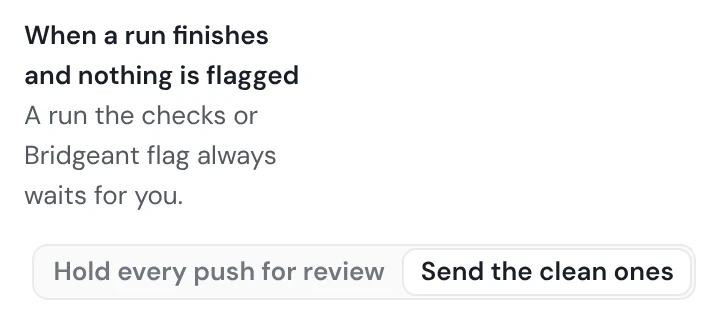
HowA new trail holds every push for review by default. Once you trust it, switch "When a run finishes and nothing is flagged" to "Send the clean ones". Some templates start that way, and an admin can set it for the whole workspace.
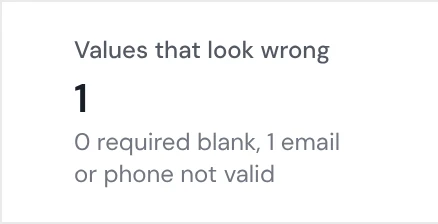
Incomplete records stop for a look before your CRM
A record with no email or no name is one nobody can follow up, and it sits in the CRM looking real.
HowEach run lists the values that look wrong: blank required fields, and emails or phones that aren't valid. A blank required field holds the run for you by default, and a row with no email isn't sent. Rows the CRM refuses are listed with its reason.
Any number in the CRM traces back to its file
When a figure in the CRM looks wrong, someone has to find which file it came from.
HowEach run has its own page: the file, what each step did, and what was pushed.
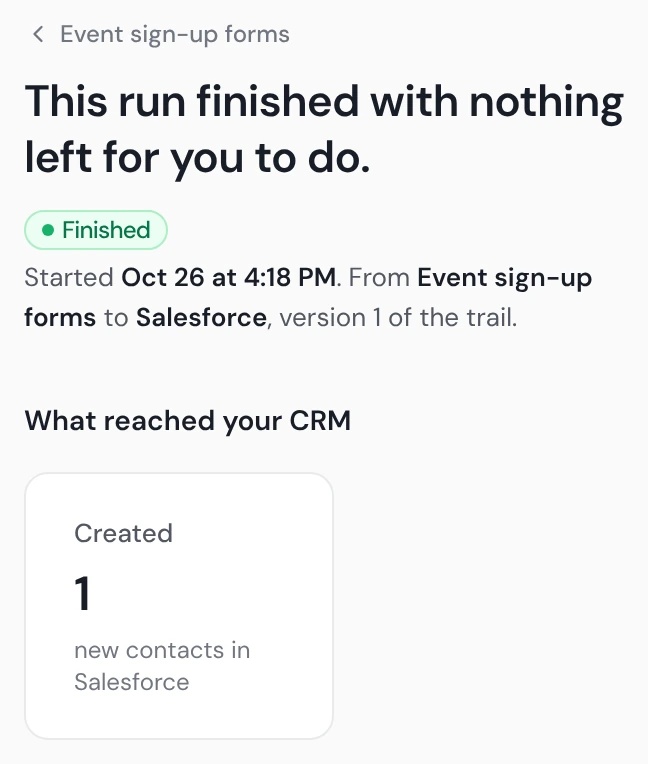
Every file lands in your CRM's own fields
A file in someone else's format means mapping it by hand each time.
HowThe trail uses one of your saved mappings (Starter and up), and each run keeps its own copy, so editing the mapping mid-run can't change it.
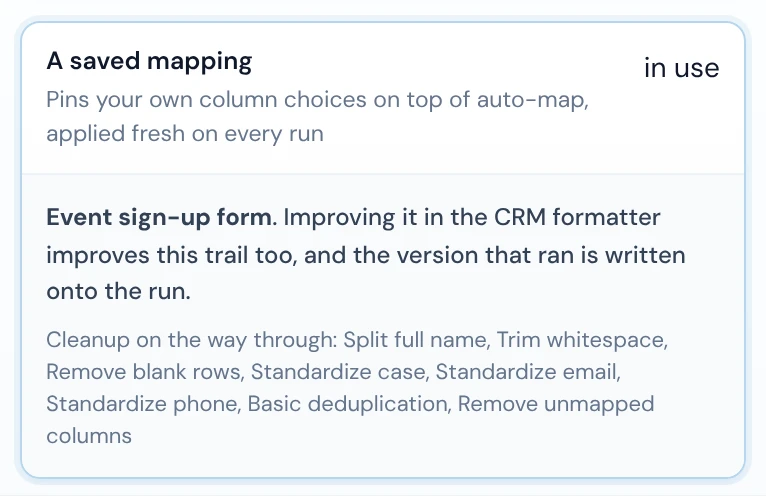
Every document accounted for, before it reaches your CRM
| File | Arrived | Where it went |
|---|---|---|
| stand-signup-yara-chen.pdf | Tue, Oct 27 | In Salesforce |
| stand-signup-victor-whitfield.pdf | Tue, Oct 27 | In Salesforce |
| stand-signup-victor-park.pdf | Tue, Oct 27 | In Salesforce |
| stand-signup-theo-bennett.pdf | Tue, Oct 27 | In Salesforce |
| stand-signup-sofia-rahman.pdf | Tue, Oct 27 | In Salesforce |
| stand-signup-sofia-kapoor.pdf | Tue, Oct 27 | In Salesforce |
| stand-signup-sofia-delgado.pdf | Tue, Oct 27 | Waiting for a look: no email |
| stand-signup-sienna-sato.pdf | Tue, Oct 27 | In Salesforce |
| stand-signup-samir-fischer.pdf | Mon, Oct 26 | In Salesforce |
| stand-signup-rafael-nguyen.pdf | Mon, Oct 26 | In Salesforce |
| stand-signup-priya-ward.pdf | Mon, Oct 26 | In Salesforce |
| stand-signup-nadia-romero.docx | Mon, Oct 26 | In Salesforce |
| stand-signup-nadia-novak.pdf | Mon, Oct 26 | In Salesforce |
| stand-signup-milo-ward.pdf | Mon, Oct 26 | In Salesforce |
| stand-signup-mei-delgado.pdf | Mon, Oct 26 | In Salesforce |
| stand-signup-marcus-romero.pdf | Mon, Oct 26 | In Salesforce |
| stand-signup-marcus-moreau.pdf | Fri, Oct 23 | In Salesforce |
| stand-signup-lucas-park.pdf | Fri, Oct 23 | In Salesforce |
| stand-signup-lina-mensah.pdf | Fri, Oct 23 | In Salesforce |
| stand-signup-liam-park.pdf | Fri, Oct 23 | In Salesforce |
| File | Arrived | Where it went |
|---|---|---|
| stand-signup-liam-chen.docx | Fri, Oct 23 | In Salesforce |
| stand-signup-kofi-nguyen.pdf | Fri, Oct 23 | In Salesforce |
| stand-signup-kofi-brandt.pdf | Fri, Oct 23 | In Salesforce |
| stand-signup-jasper-rahman.docx | Fri, Oct 23 | In Salesforce |
| stand-signup-jasper-okafor.docx | Thu, Oct 22 | In Salesforce |
| stand-signup-jasper-chen.docx | Thu, Oct 22 | In Salesforce |
| stand-signup-ivy-novak.pdf | Thu, Oct 22 | In Salesforce |
| stand-signup-ivy-kapoor.pdf | Thu, Oct 22 | In Salesforce |
| stand-signup-iris-laurent.pdf | Thu, Oct 22 | In Salesforce |
| stand-signup-ingrid-ruiz.docx | Thu, Oct 22 | In Salesforce |
| stand-signup-hugo-achebe.pdf | Thu, Oct 22 | In Salesforce |
| stand-signup-hana-haddad.docx | Thu, Oct 22 | In Salesforce |
| stand-signup-freya-ortega.pdf | Wed, Oct 21 | In Salesforce |
| stand-signup-felix-qureshi.pdf | Wed, Oct 21 | Waiting for a look: no email |
| stand-signup-elena-whitfield.pdf | Wed, Oct 21 | In Salesforce |
| stand-signup-elena-ivanova.pdf | Wed, Oct 21 | In Salesforce |
| stand-signup-dev-nguyen.pdf | Wed, Oct 21 | In Salesforce |
| stand-signup-ada-sato.docx | Wed, Oct 21 | Waiting for a look: email not valid |
| stand-signup-ada-hughes.pdf | Wed, Oct 21 | In Salesforce |
| stand-signup-ada-brandt.pdf | Wed, Oct 21 | In Salesforce |
| stand-signup-sofia-delgado.pdf | Tue, Oct 27 | Waiting for a look: no email |
| stand-signup-felix-qureshi.pdf | Wed, Oct 21 | Waiting for a look: no email |
| stand-signup-ada-sato.docx | Wed, Oct 21 | Waiting for a look: email not valid |
Show the 37 in Salesforce
| stand-signup-yara-chen.pdf | Tue, Oct 27 | In Salesforce |
| stand-signup-victor-whitfield.pdf | Tue, Oct 27 | In Salesforce |
| stand-signup-victor-park.pdf | Tue, Oct 27 | In Salesforce |
| stand-signup-theo-bennett.pdf | Tue, Oct 27 | In Salesforce |
| stand-signup-sofia-rahman.pdf | Tue, Oct 27 | In Salesforce |
| stand-signup-sofia-kapoor.pdf | Tue, Oct 27 | In Salesforce |
| stand-signup-sienna-sato.pdf | Tue, Oct 27 | In Salesforce |
| stand-signup-samir-fischer.pdf | Mon, Oct 26 | In Salesforce |
| stand-signup-rafael-nguyen.pdf | Mon, Oct 26 | In Salesforce |
| stand-signup-priya-ward.pdf | Mon, Oct 26 | In Salesforce |
| stand-signup-nadia-romero.docx | Mon, Oct 26 | In Salesforce |
| stand-signup-nadia-novak.pdf | Mon, Oct 26 | In Salesforce |
| stand-signup-milo-ward.pdf | Mon, Oct 26 | In Salesforce |
| stand-signup-mei-delgado.pdf | Mon, Oct 26 | In Salesforce |
| stand-signup-marcus-romero.pdf | Mon, Oct 26 | In Salesforce |
| stand-signup-marcus-moreau.pdf | Fri, Oct 23 | In Salesforce |
| stand-signup-lucas-park.pdf | Fri, Oct 23 | In Salesforce |
| stand-signup-lina-mensah.pdf | Fri, Oct 23 | In Salesforce |
| stand-signup-liam-park.pdf | Fri, Oct 23 | In Salesforce |
| stand-signup-liam-chen.docx | Fri, Oct 23 | In Salesforce |
| stand-signup-kofi-nguyen.pdf | Fri, Oct 23 | In Salesforce |
| stand-signup-kofi-brandt.pdf | Fri, Oct 23 | In Salesforce |
| stand-signup-jasper-rahman.docx | Fri, Oct 23 | In Salesforce |
| stand-signup-jasper-okafor.docx | Thu, Oct 22 | In Salesforce |
| stand-signup-jasper-chen.docx | Thu, Oct 22 | In Salesforce |
| stand-signup-ivy-novak.pdf | Thu, Oct 22 | In Salesforce |
| stand-signup-ivy-kapoor.pdf | Thu, Oct 22 | In Salesforce |
| stand-signup-iris-laurent.pdf | Thu, Oct 22 | In Salesforce |
| stand-signup-ingrid-ruiz.docx | Thu, Oct 22 | In Salesforce |
| stand-signup-hugo-achebe.pdf | Thu, Oct 22 | In Salesforce |
| stand-signup-hana-haddad.docx | Thu, Oct 22 | In Salesforce |
| stand-signup-freya-ortega.pdf | Wed, Oct 21 | In Salesforce |
| stand-signup-elena-whitfield.pdf | Wed, Oct 21 | In Salesforce |
| stand-signup-elena-ivanova.pdf | Wed, Oct 21 | In Salesforce |
| stand-signup-dev-nguyen.pdf | Wed, Oct 21 | In Salesforce |
| stand-signup-ada-hughes.pdf | Wed, Oct 21 | In Salesforce |
| stand-signup-ada-brandt.pdf | Wed, Oct 21 | In Salesforce |
The week's 40 sign-up forms: 37 in Salesforce, 3 waiting for a look.
Nothing half-read reaches your CRM
Broken files named
A PDF or Word file that won't open is refused with "This PDF couldn't be opened." or "This Word file couldn't be opened."
Scanned PDFs turned away
A PDF with no text is refused with "There's no text in this document to read."
Old Word files turned away, with the fix
A .doc file is refused with "Save it as .docx or PDF and send it again."
Long PDFs refused, not cut short
A PDF over 50 pages is refused with words to split it, rather than read in part.
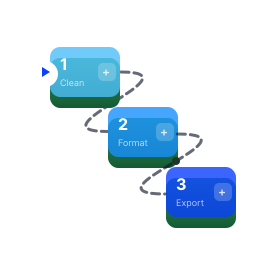 Trails →Run the same steps on each file a folder receives
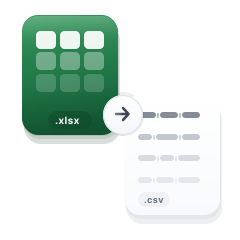 PDF and Word reading →Tables, forms and text into rows
 CRM Formatter →Maps each column to the CRM's own field
HubSpot, Salesforce and Pipedrive data entry

HubSpot
Each document's rows arrive as contacts or companies.
Salesforce
As Contacts, Leads or Accounts.

Pipedrive
As people or organizations.
Data entry automation questions
What is data entry automation?
Data entry automation is moving information from documents and files into a system without anyone typing it in. Operelio does it for CRM records: it reads PDFs, Word files and spreadsheets into rows, cleans them, and pushes them to your CRM.
Can Operelio read a PDF into my CRM?
Operelio reads a PDF emailed to a folder's address: its tables become rows, and a filled PDF form becomes one row with each field as a column. A scanned PDF with no text is refused.
Can Operelio read Word documents?
Operelio reads Word (.docx) files: tables become rows, and a form laid out as a table of labels and answers, or as "Field: value" lines, becomes one row. Answers typed into Word's fill-in boxes aren't read. Old .doc files need saving as .docx or PDF first.
Which documents can't be read?
Operelio can't read a scanned PDF with no text, an old .doc file, a PDF over 50 pages, or a file that won't open, and it refuses each one with the reason instead of guessing.
Does anything reach my CRM without my approval?
Not on a trail you build yourself: it holds every push for review until you or an admin turn on Send the clean ones. A run with anything flagged waits for you either way.
How often does automated data entry run?
A trail runs on every file its folder receives, or on a schedule you set.
Can I try data entry automation for free?
You can build a trail and test it on your own file for free. Running it on its own and pushing to your CRM start on Starter, at $39 a month.
Stop typing in your next PDF or Word form
Build a trail and test it on your own file. Running it starts on Starter.