
Email list cleaning for HubSpot and Salesforce
Fewer bounces from every list you send
Clean a list before it reaches your email tool or your CRM. Every row gets a status and a reason, and you choose what goes out.

| Name | Status | Reason | |
|---|---|---|---|
| Maya Patel | maya.patel@northwind-labs.example | Safe to send | deliverable |
| Owen Brooks | owen.brooks@harborline | Invalid | bad syntax |
| Zoe Laurent | zoe.laurent@gmial.com | Invalid | typo domain |
| Tom Okafor | tom.okafor@oldmill-supply.example | Invalid | no mx |
| - | test-signup1@mailinator.com | Disposable | disposable |
| - | sales@brightpath.example | Role account | role account |
How bad addresses get into a list
Event badge scans
Typed in a hurry at a booth, with typos in the domains.
Old CRM exports
Contacts from years ago, some long gone from their jobs.
Purchased lists
Addresses nobody on your team has mailed yet.
Form and webinar sign-ups
Personal and throwaway addresses mixed in with work ones.
Lists from sales reps
Personal spreadsheets with no record of what bounced.
What a clean email list gives your team
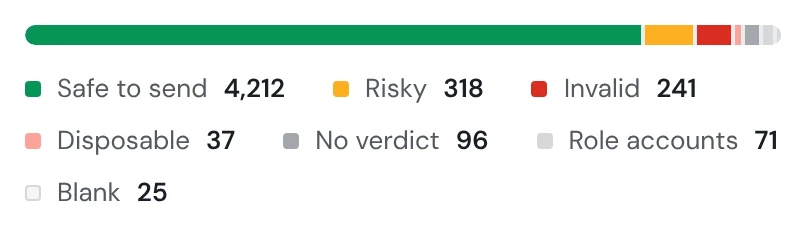
Fewer bounces, so your emails land in inboxes
Every bounce counts against your sending domain, and enough of them send the whole team's emails to spam.
HowQuick clean catches bad syntax, domains with no mail server and throwaway addresses, on every plan, with no credits. Full verification checks whether each mailbox exists, from Starter.
Reps only chase leads they can reach
An email to an address that doesn't exist is time a rep won't get back.
HowEach row is marked send, review or exclude, with why. Download only the rows marked send.

You pay to check only the addresses that need it
Paying to check an address that is plainly broken is money for nothing.
HowRows the free checks already ruled out cost nothing, and each address the paid check looks at costs one credit, including one that goes on to a second check.

The call on what goes out stays yours
A tool that deletes rows behind your back takes the decision out of your hands.
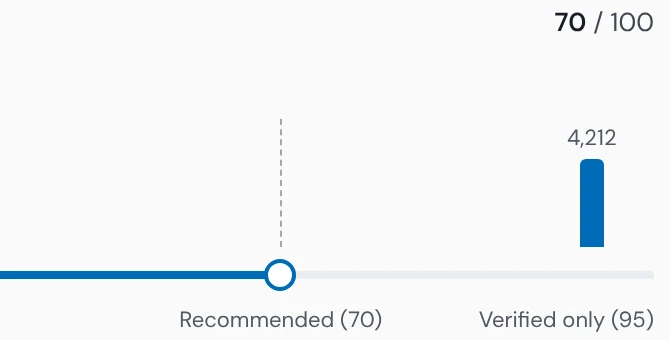
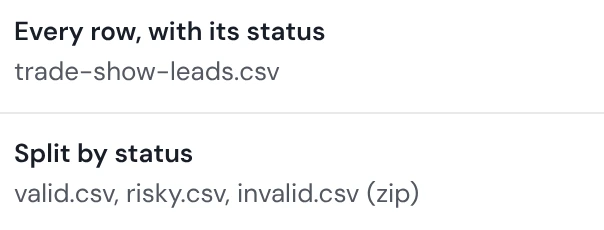
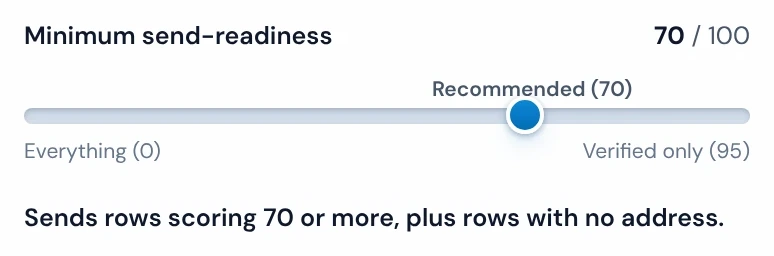
HowA 0 to 100 send-readiness score lets you set the bar (70 recommended after Full verification). Download the rows above it, every row with its status, or valid, risky and invalid as three files (CSV results).
Leads with a missing or mistyped address aren't written off
A lead without a working email is a lead you paid for and can't reach.
HowWhen the list has a website or domain column, Find missing emails rebuilds an address from the person's name and the company's email pattern in the same list, then checks it, one credit per address it checks. It starts from the results page. A likely typo like gmial.com gets a suggested fix in its own column, and the original stays.
Every new list arrives in your CRM already clean
One bad import fills the CRM with contacts nobody can email, and they're slow to dig out.
HowA trail's Verify emails step checks each new file and pushes only the rows above the bar you set, to HubSpot, Salesforce or Pipedrive.
Send, review or exclude, address by address
The trade show list, checked: the counts, the reasons, and the files you can take away.
Honest labels, and no row deleted
Every row kept
Nothing is deleted from your results.
Catch-all named as catch-all
A domain that accepts every address is never called verified.
Free checks first
Quick clean rules out plainly broken addresses before any credit is spent.
Role addresses flagged
info@ and sales@ are marked as shared inboxes, not called invalid.
 Email Verifier →Quick clean and Full verificationFind missing emails →Rebuilds an address from a name and the company's pattern
 Trails →The Verify emails step on each file a folder receives
HubSpot, Salesforce and Pipedrive email lists



Export the contacts, clean the file, and push it back. Operelio doesn't read your CRM's own bounce flags.
Email list cleaning questions
What is email list cleaning?
Email list cleaning is finding the addresses on a list that would bounce, are disposable or can't be reached, before you send to it or import it into a CRM. Operelio marks each row send, review or exclude, with the reason.
What's the difference between email list cleaning and email verification?
Email verification checks whether each address can receive mail; email list cleaning uses those verdicts to decide which rows to send, review or leave out, and finds addresses that are missing. For one address, use the free checker on the Email Verifier page.
Does cleaning an email list delete rows?
Cleaning a list in Operelio deletes no rows: you choose which rows to download. In a trail, the rows below your bar stay out of the push.
Does email list cleaning fix typos in addresses?
Operelio suggests a fix for a likely typo, such as gmial.com, in its own column, and leaves the original address as it was.
Can I clean the email addresses already in my CRM?
You can clean the addresses already in your CRM through an export: export the contacts, clean the file in Operelio, and push it back to HubSpot, Salesforce or Pipedrive. Operelio doesn't read your CRM's own bounce flags.
Can each new list be cleaned before it reaches my CRM?
A trail cleans each new list before the push: every file its folder receives is verified first. See Trails.
How much does email list cleaning cost?
Quick clean screens a list with none of your verification credits, and Full verification uses one credit for each address it checks. Starter includes 1,000 a month, Pro 4,000 and Agency 12,000.
Clean your next list before you send it
Start with Quick clean on any plan. Full verification comes with Starter, at $39 a month.