
Updated November 1, 2026
Starter plan
Automate Excel cleanup in one workflow
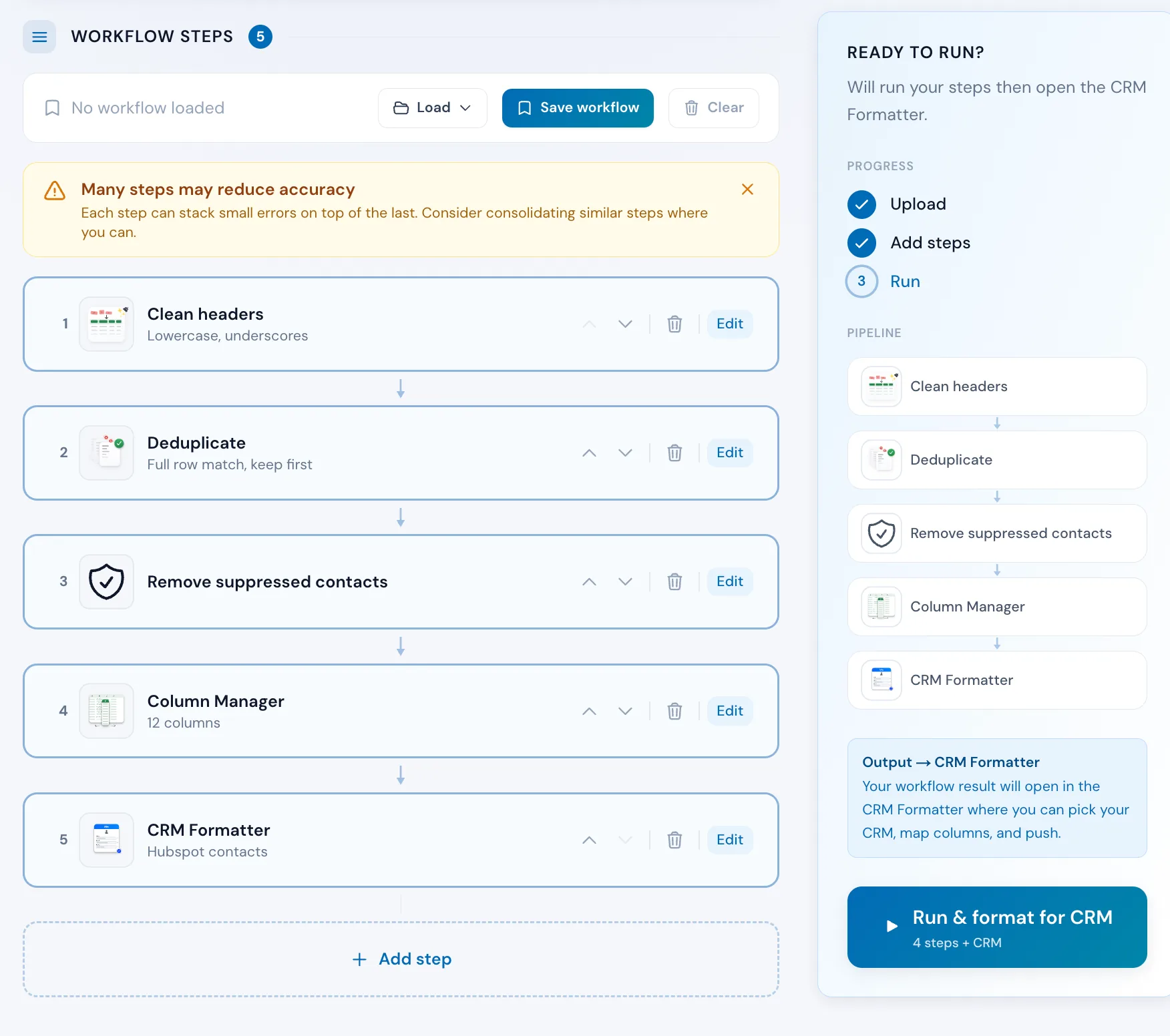
To automate Excel cleanup, build it once in Workflow Builder as a chain of steps and run it on each new file in one pass. Clean headers, deduplicate, drop Do Not Contact rows and format for your CRM.
Workflow Builder is a Starter feature. Individual tools are free to use.
Step by step
How to automate Excel cleanup without macros
Build the cleanup once in Workflow Builder as a chain of steps, save it, and run it on each new CSV or Excel file in one pass. No macros or VBA.
- 1Upload your CSV or Excel file. Operelio reads its columns so every step can use them by name.
- 2Add a step for each piece of cleanup you would do by hand, such as Clean Headers, Deduplicate or Remove suppressed contacts, in the order you want.
- 3Click Save workflow and give it a name.
- 4Click the run button, which counts your steps (Run 3 steps). Each step runs in order and you get one cleaned file to download. With CRM Formatter as the last step, the button reads Run and format for CRM.
- 5When the next file arrives, upload it, pick your workflow under Load and run it again, or start a trail from it to run the same steps on each new file.
Seven tools, any order
Clean Headers, Deduplicate, Find & Replace, Filter & Extract, Column Manager, Remove suppressed contacts, and CRM Formatter. Pick the tools you need in the order you need them. CRM Formatter, if added, runs last.
Remove suppressed contacts
Add a step that drops rows on your Do Not Contact list before the output. Block by email, phone, website domain, company or country, with whole regions selectable at once and a one-click sanctions preset. Costs no credits.
Up to eight steps
Each workflow chains up to eight steps. Find & Replace and Filter & Extract can repeat; the others appear once. At eight, Add step reads Step limit reached.
Save once, reuse later
Save a workflow and run it on future files without reconfiguring. Starter keeps 10 saved workflows, Pro 50, Agency 200.
Column names stay in sync
Rename, split, or clean a column in an early step, and later steps' dropdowns show the new column names. No guessing what exists mid-workflow.
Live, step-by-step progress
Watch each step finish in real time. The results page shows rows in vs rows out per step. If a step fails, the rest are skipped.
Push to your CRM in the same run
Add CRM Formatter last to map columns for any of 8 CRMs, then download, or push to HubSpot, Salesforce or Pipedrive.
How to use it
Three steps from upload to output
Upload your file
Drop in a CSV or Excel file. Operelio reads the columns so every step can reference them by name.
apollo_prospects_export_2026-02.csv
592 rows, 12 columns.
Replace fileAdd your steps
Pick tools from the list and configure each one. Each step's column dropdowns reflect what earlier steps have done.
- 1
 Clean HeadersLowercase, underscores
 - 2
 DeduplicateBy email, keep first
 - 3
 Filter & Extract1 condition (AND)
 - 4Remove suppressed contactsYour Do Not Contact list
- 5
 CRM FormatterPick your CRM after the run
Run and download
Click Run and format for CRM. Each step runs in order, and the output opens in the CRM Formatter where you map columns and push. Download the final file, or save the workflow to reuse on the next file.
Apollo sales leads for HubSpot
Saved workflow, 5 steps.
CRM Formatter
Opens with the result, as CSV
The alternative
Doing it yourself
What running these tools manually looks like.
The manual way
Download, re-upload, repeat for every step. Easy to lose track of which version is current. Starts over from scratch every time.
With Workflow Builder
One upload, one click, every step runs in order. Save the workflow and the second run takes even less time.
A repeated cleanup might not be the only problem in that file
Upload it and Bridgeant reviews the file before you commit to a tool. It reports what it finds, orders the problems by how much they actually matter, and points you at the tool for each one. That is on every plan including Free, and it works from a summary of your file rather than the contents.
On Starter and up it stops advising and starts doing. Describe the job in a sentence and Bridgeant plans the steps, shows you the plan, and runs them in the right order once you approve. You are not running four jobs by hand and trying to remember which came first.
Bridgeant, the agent inside OperelioPricing
Workflow Builder is on Starter.
Workflow Builder is on Starter, Pro and Agency, chaining up to 8 steps from all seven tools. Saved workflows: 10 on Starter, 50 on Pro, 200 on Agency. Rows per job: 50,000, 75,000 and 150,000. Each run uses one job: 300 a month on Starter, 1,000 on Pro, 3,000 on Agency. Starter from $29.25 a month, Pro from $74.25, Agency from $224.25, billed annually.
Common questions
Workflow Builder FAQ
Which tools can I chain in a workflow?
Clean Headers, Deduplicate, Find & Replace, Filter & Extract, Column Manager, Remove suppressed contacts, and CRM Formatter. Order them to fit your data. CRM Formatter, if you add it, always runs as the final step. Clean Headers, Deduplicate, Column Manager, and Remove suppressed contacts can each appear once per workflow. Find & Replace and Filter & Extract can appear multiple times.
How many steps can a workflow have?
Up to eight. Some tools like Find & Replace can appear more than once. Others like Clean Headers and Deduplicate are limited to one instance per workflow.
Can I save workflows and reuse them?
Yes. Starter saves up to 10 workflows, Pro saves up to 50, and Agency saves up to 200. Run a saved workflow with any new file without reconfiguring.
What happens if a step fails?
The remaining steps are skipped and the workflow stops. You can see which step failed and why, fix its configuration, and rerun the workflow with the same file.
Does it work with multi-tab workbooks?
Yes. A workflow reads the workbook's first tab by default, and the Sheet menu beside your file's name switches to any other. To run a workflow across every tab at once, combine the tabs into one list in Merge Files first, then feed the combined file to the workflow.
What does Workflow Builder cost?
Workflow Builder is part of every paid plan: Starter ($39/month), Pro ($99/month), and Agency ($299/month). The individual tools it chains (Clean Headers, Deduplicate, Find & Replace, Filter & Extract, and Column Manager) are free to use on their own.
Can I include a CRM push as the last step?
Yes. Add CRM Formatter last to map columns for any of 8 CRMs, then download, or push to HubSpot, Salesforce or Pipedrive.
Works well with
Deduplicate
The step most workflows start with: remove exact and similar duplicates.
Clean Headers
Tidy the column names so every later step lines up.
CRM Formatter
Map the finished file to your CRM and push to HubSpot, Salesforce, or Pipedrive.
Use case: CRM data cleansing for HubSpot, Salesforce and Pipedrive
Want the full walkthrough? Read the Workflow Builder guide →
Stop running tools one at a time.
Build a workflow once, run it on any new file within your plan's limits. Clean, transform, and format in one pass.