
Fuzzy matching: how it finds duplicate contacts
Fuzzy matching is treating two values as the same when they differ only in ways that do not change the meaning. "Jon Smith" and "John Smith" are one letter apart and, in a contact list, very likely the same person.
By Operelio team · Updated October 9, 2026
On this page9
What it is
Exact matching asks whether two values are identical. Similarity matching asks how close they are, and treats them as the same once they are close enough. The second question is the one a contact list needs, because the same person turns up spelled, punctuated and formatted in different ways.
It is used to find duplicate rows in one list, to match rows across two lists when there is no shared ID, and to standardize free text such as survey answers against a reference list.
How it works
Every tool that does it follows the same three steps.
Clean the values first
Lowercase them, trim spaces, and put emails, phone numbers and company names into one form. Many duplicates are identical once that is done, and nothing needs scoring.
Score each pair
Give every pair of values a score for how close they are, usually from 0 to 100, where 100 means identical.
Keep the pairs above a threshold
Pairs that score at or above the threshold you set count as the same. The rest stay separate.
The most common score is edit distance: the number of single characters you would have to insert, delete or change to turn one value into the other. Jon into John is one insertion. Divide by the length of the longer value and you get a percentage. Other tools score differently: Power Query compares the overlap between the two values, and Salesforce uses several methods depending on the field.
A worked example: duplicate contacts in a list
Each pair below is one person in a contact list, and exact matching catches none of them. Three are caught by cleaning the values first, two by their similarity score, and one only by a person reading it.
| The pair | Difference | Caught by |
|---|---|---|
| Jon Smith and John Smith | A missing letter | Score (90) |
| Catherine Jones and Katherine Jones | C or K | Score (93) |
| Westmarch Trading and Westmarch Trading Ltd | Company suffix | Cleaning |
| jdoe+news@gmail.com and j.doe@gmail.com | Dot and plus tag | Cleaning |
| +1 (415) 555-0123 and 415-555-0123 | Country code, punctuation | Cleaning |
| Robert Brown and Bob Brown | A nickname | Nothing (67) |
The scores are similarity out of 100. The last row, at 67, is the limit of any letter-by-letter score: Robert and Bob share almost no characters. Nicknames need a list of name variants, or a person reading the pair.
Choosing a threshold
The threshold decides how close is close enough. Set it too high and real duplicates slip through. Set it too low and different people get merged. Scored by edit distance, these name pairs show where the line falls:
| Threshold | Also counts as the same | Risk |
|---|---|---|
| 90 | Jon Smith and John Smith (90), Mark Davis and Mark Davies (91) | Misses Sara Lee and Sarah Lee (89) |
| 80 | Sara Lee and Sarah Lee (89), Anna Kim and Anne Kim (88) | Dan Lee and Dana Lee (88) may be two people |
| 70 | Steven and Stephen (71) | John Smith and Jane Smith (70) count as one |
Match on more than one column where you can. Name plus company, or name plus email domain, keeps Dan Lee and Dana Lee apart when they work at different companies. And review the pairs before you merge or delete anything.
In Excel and Power Query
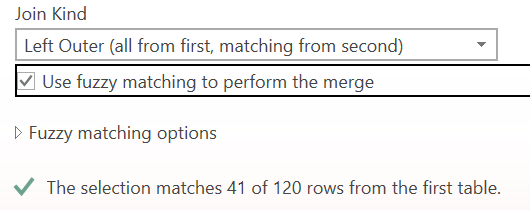
Excel's formulas only compare exact values, so similarity matching in Excel means Power Query, in Excel for Windows. When you merge two queries, check Use fuzzy matching to perform the merge at the bottom of the Merge dialog. It works on text columns only, in Excel for Microsoft 365, Excel 2024 and Excel 2021.
Microsoft's page lists Excel for Mac too, but the Merge dialog in Excel for Mac (version 16.113, October 2026) has no such box and no options for it, so on a Mac, Power Query merges on exact matches only, and those are case-sensitive.
Expand Fuzzy matching options to see Similarity threshold, Ignore case, Match by combining text parts, Maximum number of matches and Transformation table. Leave the threshold box empty for the default, 0.80, where 1.00 is an exact match. Power Query scores pairs by their overlap rather than by edit distance, and the merge matches rows across two tables rather than finding duplicates within one list.
Start with the default. When we merged a list of trade show leads with a CRM accounts export, 0.80 matched every company typed differently and made one wrong match. At 0.6, more than a dozen new companies matched accounts they only shared words with, such as Dental Group or Home Care.
Microsoft's older Fuzzy Lookup add-in for Excel is no longer on its download center, so Power Query is the route in current Excel.
If a query's columns come in as Column1, Column2 and so on, with the real headers in the first row, Excel couldn't tell the header row from the data. It happens when every column is text, as in many CRM exports. Open the query, choose Home > Use First Row as Headers, and Close & Load before you merge.
In Salesforce
Salesforce finds duplicates with matching rules, set up in Setup under Matching Rules. Each field in a rule is matched exactly or by a similarity method, and the standard rules for accounts, contacts and leads already use several, such as edit distance for street names and name-variant matching for first names.
A matching rule only finds candidates. A duplicate rule, under Duplicate Rules in Setup, decides what happens: warn the user or block the save. A duplicate rule can use up to three matching rules, and each object can have up to five active matching rules.
In Python
For developers, RapidFuzz and thefuzz are the common libraries for scoring how alike two strings are, and Python's standard library has difflib for the same job. recordlinkage handles the larger task of matching whole records across files. Each takes code to set up, which is worth it for a pipeline but slow for a one-off list.
Similarity matching in Operelio
Operelio's Deduplicate tool has two modes for this, and you pick one for each run, without code. Smart matching cleans values before it compares them: Gmail addresses match with dots and plus tags ignored, phone numbers match whatever the punctuation, and company names match with suffixes like Ltd, Inc and GmbH stripped.
Similarity matching scores each pair from 0 to 100 by the number of character edits between them, and you set the threshold with a slider. It starts at 80. Pick more than one column and the score is averaged across them. Every mode is on every plan, including Free, and you can download the removed rows to check what was dropped.
Find the duplicates that differ by a letter or a suffix, with a threshold you set.
Related
Frequently asked questions
What is fuzzy matching?
Treating two values as the same when they differ only in ways that do not change the meaning, such as a typo, a missing letter, extra spaces or a company suffix. Jon Smith and John Smith are the usual example.
What is fuzzy name matching?
Matching people's names despite typos and spelling variants, like Catherine and Katherine. Letter-based scores catch those well. Nicknames like Robert and Bob need a list of name variants, because the names share too few letters.
How does fuzzy matching improve data accuracy?
It finds the duplicates exact matching misses, so one person is one record. That means one owner, one activity history and one email per person, and counts that reflect real people rather than spellings.
Ready to get started?
Upload a file and run your first transformation. Free, no credit card required.