
CRM migration tool for HubSpot and Salesforce
Move to your new CRM with clean records, every one counted. Clean the old CRM's export on the way across, and see what reached the new one.
 Your old CRMHubSpot
52,000contacts
at 9,012 companies
hubspot-contacts-export.csv
- 1,036 duplicates
- 412 company name variants
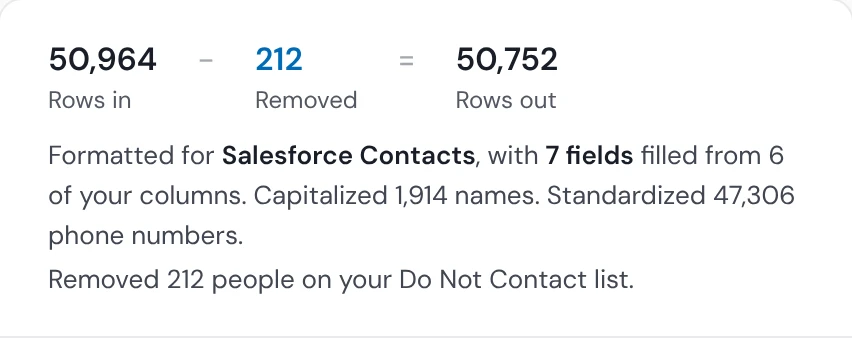
- 212 on your Do Not Contact list
- Scored61 to 70
- Duplicates1,036 removed
- Do Not Contact212 removed
- Mapped7 fields
- Owners3 reps
 Your new CRMSalesforce
50,364contacts in Salesforce
48,224 created
2,140 already there, updated
- 8,846 Accounts, contacts linked
- 388 held back, no email
- 3 reps own every contact
HubSpotOld CRMSalesforceNew CRM- First Name
- ravi
- First Name
- Ravi
- Last Name
- menon
- Last Name
- Menon
- ravi.menon@
northwind-labs.example - ravi.menon@
northwind-labs.example - Phone Number
- 617.555.0101
- Phone
- 6175550101
- Company Name
- Northwind Labs Inc.
- Account Name
- Northwind Labs
- Job Title
- Head of Sales
- Title
- Head of Sales
- Contact owner
- owner@
example.test - Owner
- owner@
example.test
Every CRM migration starts with an export
A HubSpot export
Contacts and companies, each as its own file.
A Salesforce export
Contacts, Leads and Accounts.

A Pipedrive export
People and organizations.

An older tool
Any CRM or spreadsheet that exports a CSV or Excel file.
What a clean CRM migration gives your team
Contacts stay linked to their company on Salesforce and Pipedrive
A contact cut off from its company loses its account history and its owner, and someone relinks them by hand, one at a time.
HowOn Salesforce and Pipedrive, each contact's company column finds the Account or organization with that exact name, or creates it, and links the contact to it. Salesforce Leads keep the company as text. On HubSpot, contacts and companies go in as two imports and are not linked.
AccountNorthwind Labs- Maya Patel
- Ravi Menon
- Lena Fischer
- Marco Silva
Duplicates stay behind in the old CRM
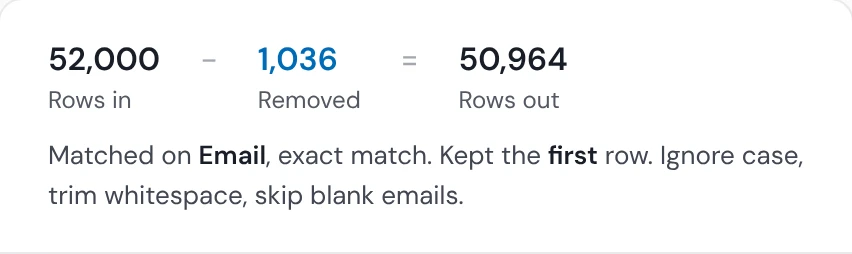
Every duplicate you carry across becomes one more record to merge in the new CRM, after reps have started using both.
HowRun Deduplicate on the export before the push, matching people on email and companies on website, and keep the copy you want.
A cleaner start in the new CRM
A move is the one time your data sits outside both CRMs, so it's the cheapest moment to fix it.
HowThe Data Health Check scores the export and lists what's wrong. Apply Fixes cleans it and scores it again. CRM Formatter maps each column to the new CRM's own fields.

You know exactly what made it across
A gap between the old CRM and the new one is cheap to fix on the day of the move and expensive a month later.
HowEach push lists the rows the new CRM didn't take, with why, so you can fix them and send them again before the old CRM is switched off.

Opt-outs come across with the people
Mailing someone who opted out in the old CRM is a complaint, and in some places a fine.
HowMap the old CRM's opt-out column to the new CRM's field so it comes across with the person, and screen the export against your Do Not Contact list before the push (Starter and up).
Owners come across with the records
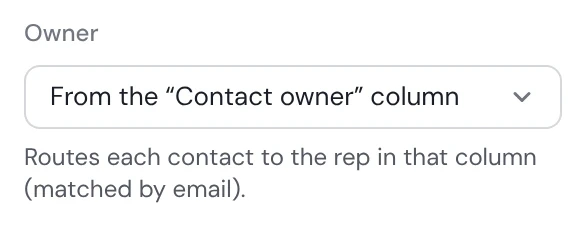
A record whose owner matches nobody in the new CRM sits unowned, and nobody follows it up.
HowMap the old CRM's owner column, and each record goes to the matching user in the new CRM: by email, or by name or email on HubSpot. No owner column? Pick one owner for the whole push.
What reached the new CRM, and what didn't

The 388 contacts that didn't move, and why.
Contacts and companies move; activity history doesn't
Operelio moves people and companies: their fields, their company links (Salesforce and Pipedrive), their owners and opt-outs. A notes column comes across as a note on new HubSpot and Pipedrive records. Logged emails and calls, deals, pipelines, automations, reports and permissions are rebuilt in the new CRM or moved with its own tools. The migration checklist covers them.
What stays safe in a CRM move
Counts before the push
You see what will be created, updated and left out before anything reaches the new CRM.
Your export untouched
Cleaning writes a new file; the old CRM's export stays as you downloaded it.
Opt-outs screened
Your Do Not Contact list is checked before anything is pushed (Starter and up).
 Data Health Check →Scores the export before anything moves
 Deduplicate →Finds the same person or company twice in the export
 CRM Formatter →Maps and tidies the export for the new CRM
 Do Not Contact lists →Screens the export before the push
HubSpot, Salesforce and Pipedrive CRM migration
Moving to HubSpot
Contacts and companies arrive as two lists; link them in HubSpot afterwards.
Moving to Salesforce
Contacts link to Accounts by company name, and a missing Account is created. Leads keep their company as text. Salesforce's duplicate rules can stop rows; see what they do.
Moving to Pipedrive
People link to organizations by name, and a missing organization is created.
CRM migration questions
What is a CRM migration tool?
A CRM migration tool moves your records from an old CRM into a new one, with the fields mapped and the duplicates left behind.
Does Operelio move data straight from one CRM to another?
Operelio doesn't connect to the old CRM: it works from the old CRM's export, which it cleans, maps and pushes to the new one.
Can I migrate from Pipedrive to HubSpot, or HubSpot to Salesforce?
Operelio moves contacts and companies between HubSpot, Salesforce and Pipedrive in any direction: export from one and push to another. Any CRM that exports a CSV or Excel file can be the old one.
Will contacts stay linked to their companies after a migration?
Contacts stay linked to their companies in Salesforce and Pipedrive: each contact's company column finds or creates the Account or organization by its exact name and links the contact to it. In HubSpot, Operelio pushes contacts and companies as two imports without linking them.
Do record owners carry over to the new CRM?
Yes, when the export has an owner column of your reps' emails. A rep who isn't in the new CRM leaves the record unowned.
Do unsubscribes carry over to the new CRM?
Only as a field you map: Operelio doesn't write HubSpot's subscription status or Salesforce's and Pipedrive's opt-out flags for you.
Can I try the CRM migration tool for free?
You can score and clean your old CRM's export on the Free plan, on files up to 2,000 rows. Pushing to a CRM starts on Starter.
Check your CRM export for free
Score your old CRM's export, then push it when you're ready. Pushing starts on Starter, at $39 a month.