
Your email suppression list: scrub every file before you import.
A suppression list is a list of people you must never contact, such as those who unsubscribed, addresses that hard bounced and people who marked your email as spam. Upload yours once as your Do Not Contact list, and the CRM Formatter screens every file against it, removes the matches and hands the removed rows back in their own file. Matching runs on your data, with no third-party calls.
What is a suppression list in email marketing?
A suppression list also holds anyone you leave out on purpose, such as competitors or current customers in a sales campaign. Email platforms check every send against their own copy of it.
What goes on a suppression list?
Anyone who said no, any address that can't take mail, and anyone you chose to leave out. Most lists come from five sources:
- Unsubscribes: people who clicked unsubscribe or asked you to stop.
- Hard bounces: addresses that don't exist or permanently refuse mail.
- Spam complaints: people who marked your email as spam.
- Legal and compliance holds: people your legal or privacy team says not to contact.
- Manual holds: competitors, current customers in a sales campaign, partners, anyone you leave out on purpose.
Suppression list vs unsubscribe list
An unsubscribe list holds the people who opted out of one sender's email. A suppression list holds them too, plus bounces, complaints and your own holds, and it should apply wherever contacts come in.
| Question | Unsubscribe list | Suppression list |
|---|---|---|
| Who adds an entry | The contact, by unsubscribing. | The contact, your email platform (bounces, complaints) and your team. |
| What it blocks | Email from that sender, sometimes from one list only. | Contact from any campaign or tool that checks it. |
| Where it lives | Inside one email platform. | One list your team keeps and checks before every send and import. |
How to build a suppression list
Gather every opt-out, bounce and complaint you already have into one file, add your own holds, and upload it to the place every new file passes through.
- Export unsubscribes, hard bounces and spam complaints from every email platform you send from.
- Export the contacts marked as unsubscribed or do not contact in your CRM.
- Add your legal and compliance holds and anyone you leave out on purpose.
- Put it all in one file, with a column for each kind of value: email, phone, website domain, company name.
- Upload it once, where every new file passes through. In Operelio that is Settings, Do Not Contact.
How to manage a suppression list
Give it one owner, add to it every time someone opts out or bounces, and check every new file against it before import.
- One owner, one list. Copies kept in different tools drift apart. Keep one list and copy it from there into each tool.
- Add after every send. Export new unsubscribes, bounces and complaints after each campaign and add them. Operelio skips values already on the list.
- Check before every import. Screen each new file before it reaches the CRM, not after.
- Don't prune it. Remove an entry only when that person asks to hear from you again.
What does it mean to scrub a list?
Scrubbing a list means removing the contacts you shouldn't send to before you use it. That covers two kinds: addresses that can't receive mail, which email verification finds, and people who said no, who are on your suppression list. For the first kind across a whole list, see email list cleaning.
Most guides to scrubbing leave out the second. Scrub against your suppression list too, and do it before the file reaches your CRM, or people who opted out can come back as new contacts.
Is a suppression list required by law?
The laws don't use the name, but they require you to honor opt-outs, and a suppression list is how you do it.
- United States: under CAN-SPAM you must honor an opt-out within 10 business days, and you can't sell or transfer the addresses of people who opted out. The law makes no exception for business-to-business email (FTC's CAN-SPAM compliance guide).
- United Kingdom: people have an absolute right to object to their data being used for direct marketing. The ICO says it is usually better to suppress their details than to erase them, keeping just enough to respect that choice (ICO, the right to object).
This isn't legal advice. Check what applies to your outreach with your own counsel.
Why a suppression list has to cover imports, not only sends
Your email platform checks its list when you send. It doesn't see the files that reach your CRM first, and a contact who opted out can come back in one of them and be emailed again:
- A bought or rented list: the vendor doesn't know who unsubscribed from you.
- An event export: trade show badge scans and webinar sign-ups include people who opted out of your email months ago.
- A client spreadsheet: a list a client sends over can hold people who already opted out of your email.
Once imported, they look like any new contact. So the list has to sit in front of the CRM as well as the sending tool. In Operelio the CRM Formatter checks every file against it before import, by email, phone, website domain, company name or country, and trails and workflows do the same when you add the step.
Two ways to stop the wrong contact.
Screen individual contacts against your uploaded list, or block whole countries. Both run locally, and both hand back what they removed.
Match the contact
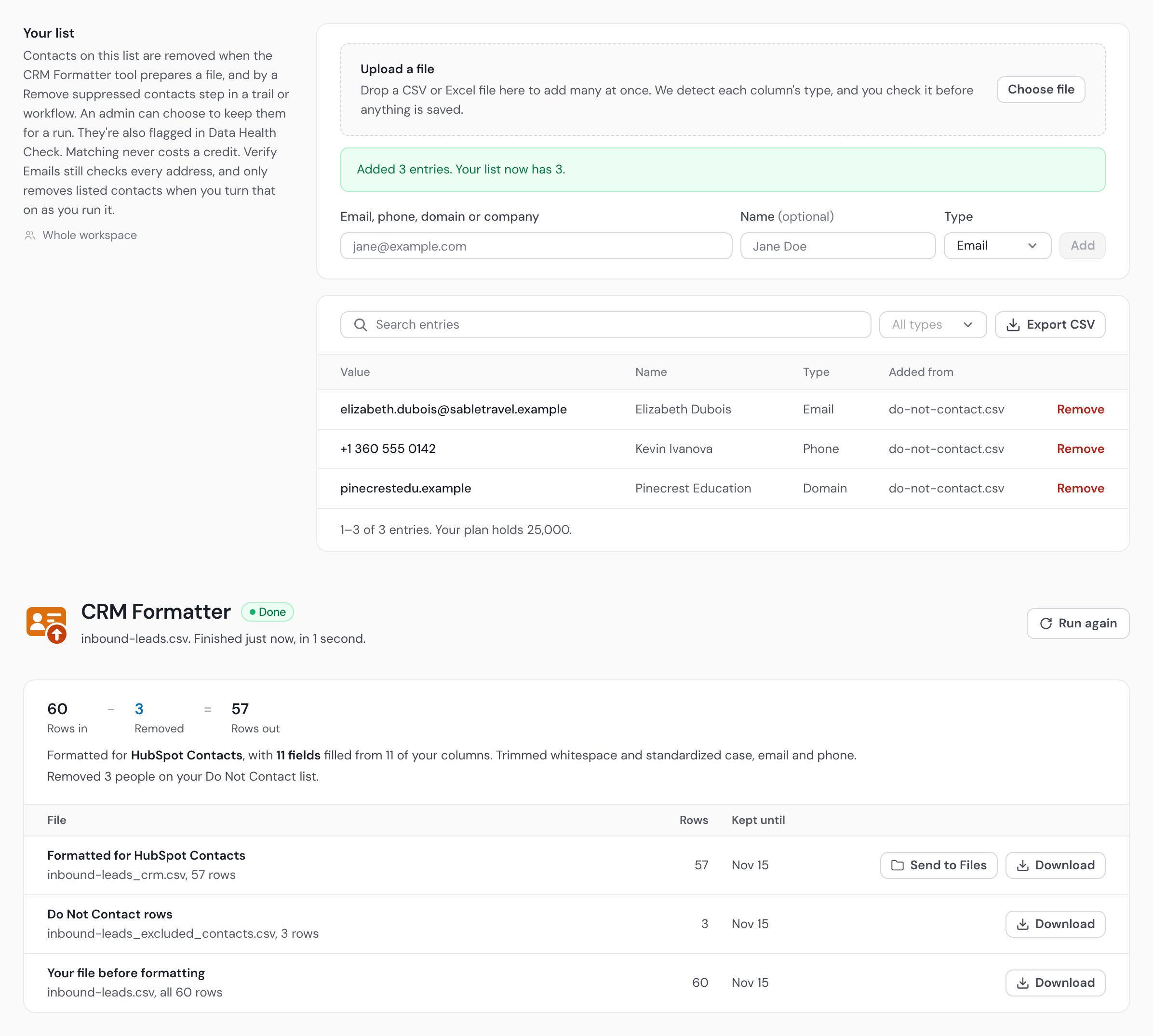
Your uploaded list, matched four ways.
Email, phone, company, or website domain, each normalized first so dot tricks, plus tags, and "Ltd" don't slip through.
| Value | Name | Type | Source |
|---|---|---|---|
| r.okafor@harborviewlog.example | Rachel Okafor | dnc_upload.csv | |
| Harborview Logistics | — | Company | dnc_upload.csv |
| m.feldt@kestrelhq.example | Marcus Feldt | crm_optouts.csv | |
| +44 20 7946 0102 | — | Phone | crm_optouts.csv |
| priya.nair@lumenfreight.example | Priya Nair | manual | |
| Tidewater Media | — | Company | dnc_upload.csv |
Block by country
Suppress whole countries at once.
From a country column or a phone dial code, with a one-click Sanctioned (OFAC) preset and your own rule for rows we can't place.
Your list never leaves your workspace.
Most tools ship your suppression list off to a third party to do the matching. Operelio doesn't. Matching runs on our own infrastructure, against your workspace data only, so your Do Not Contact list is never handed to a data broker, and it never costs a credit.
Local matching
Screening happens inside your workspace, not on some shared list.
No third-party brokers
Your contacts are never sent out to be checked against anyone else's data.
Never uses credits
Screening your list is included in your plan. It doesn't draw from your verify or job credits.
Set it once. It guards the way into your CRM.
The CRM Formatter screens against it by default, before anything is pushed. In a trail or a workflow you add the Remove suppressed contacts step, and in the Email Verifier and Bridgeant you switch it on for the run. The CRM Formatter hands removed rows back in a file of their own, so you can prove exactly what was taken out.
 CRM FormatterTrails
 Email Verifier
 Workflows
 Bridgeant
Suppression comes with Starter and up.
The Do Not Contact list comes with Starter, Pro, and Agency. Each entry is one email, phone, company, or website domain you never want contacted, and your limit grows with your plan.
The things people ask first.
What plan do I need?+
The Do Not Contact list is on the Starter, Pro, and Agency plans. It isn't part of the Free plan. Your limit is 5,000 entries on Starter, 25,000 on Pro, and 100,000 on Agency.
What can I match on?+
Email, phone, company or website domain, and company name, each normalized before matching, plus country from a country column or a phone dial code. A domain entry is checked against a website or domain column, not the domain in an email address. Personal names aren't matched, since that would remove too much.
How do I build my list?+
Upload a file of contacts to suppress, add entries one at a time, bring them in from a CRM export, or add them from your own code with the API (Pro and up). Each entry is one email, phone, company, or website domain.
Which tools honor the list?+
The CRM Formatter, trails, the Email Verifier, workflows, Bridgeant and Data Health Check, which flags rows on the list. The CRM Formatter screens every file against it by default. In a trail or a workflow you add a Remove suppressed contacts step and select your list, blocked countries, or both, and a trail holds the file if the check cannot run. In the Email Verifier and Bridgeant you add it to the run: a toggle, or a request. Your own code can check a value against it over the API (Pro and up), and an AI assistant can over the MCP server.
Where does my suppression list go?+
Nowhere. Matching runs inside your workspace on Operelio's own servers. Your list is never sent to a third party, and it never uses credits.
Do the removed contacts just disappear?+
No. They come back in a separate excluded-contacts file, so you can see exactly which rows were removed and why.
Does this make my outreach compliant?+
It helps you honor do-not-contact requests by keeping flagged contacts out of your files. It isn't legal advice and doesn't replace your own compliance process.
CRM Formatter
Map your columns once and push a clean file into HubSpot, Salesforce, or Pipedrive.
Email Verifier & Finder
Check every address, recover the good ones, and drop the bounces before you send.
Guide: suppression lists
The full how-to: upload formats, matching fields, country rules, and where suppression applies.
Keep the wrong contacts out of every file.
Upload your list once and it guards every file on its way to your CRM. Comes with Starter and up.