
Operelio browser extension
Free spreadsheet tools, in your browser's side panel.
Drop a CSV or Excel file into the panel, pick one of 13 tools, and download the result, with no account. On a paid plan, the panel also sends files to Operelio and follows them through a trail into your CRM.


 FirefoxComing soon
- OperaComing soon
Use the tools in your browser now
Free. Works signed out.

Free, with no account
13 tools that run on your computer. Pick one, run it, download the result.
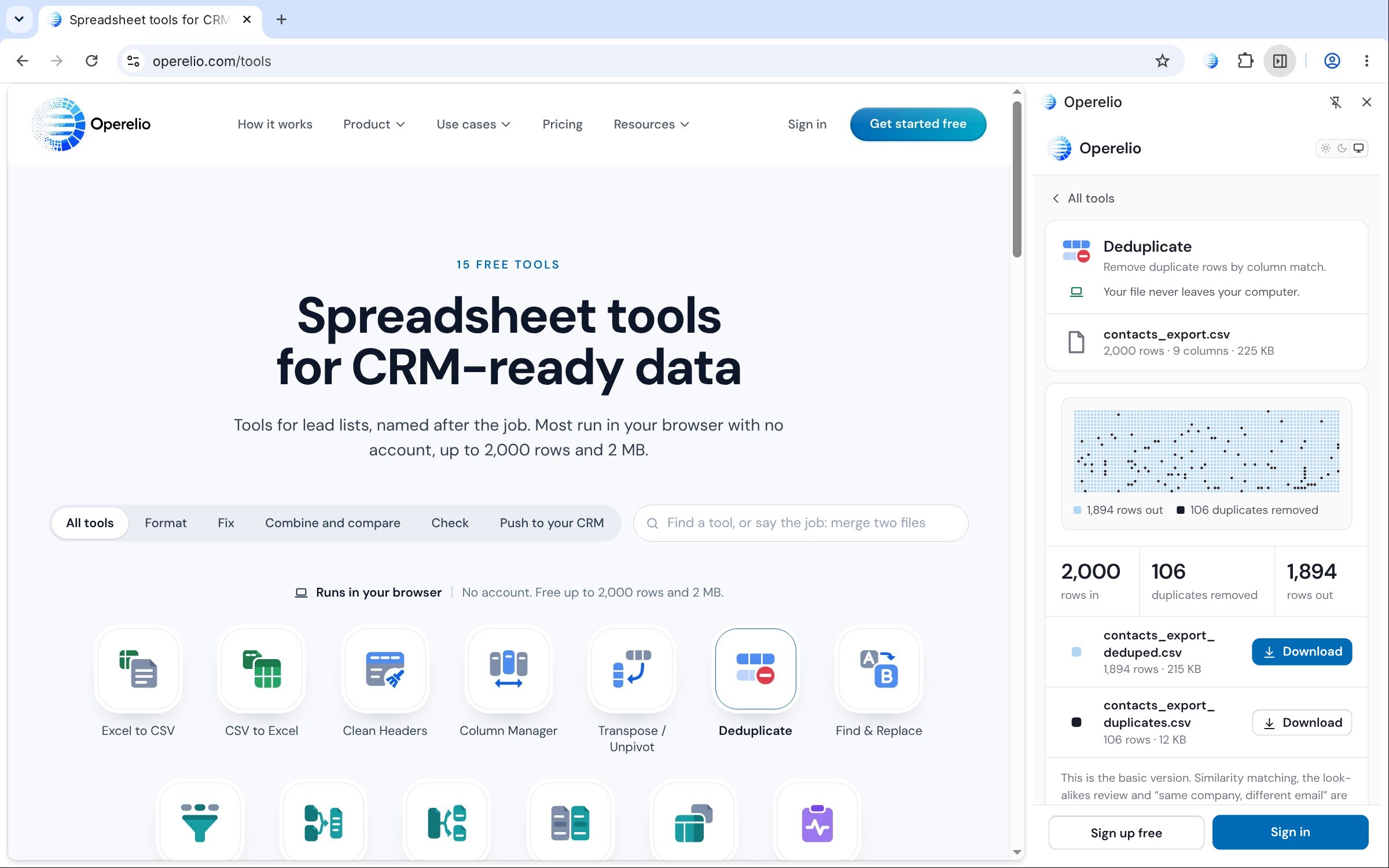
Drop a .csv, .xlsx or .xls file into the panel, or try the sample of 2,000 contacts. Each tool has its settings, one run button, the figures from the run, and a Download button for each file it makes. Your file never leaves your computer.
Convert4
Clean5
A run, in the panel
Deduplicate on the sample file: the figures from the run, then a Download button for the kept rows and one for the duplicates it took out. Both files download straight from the panel.
When a file is bigger than the panel
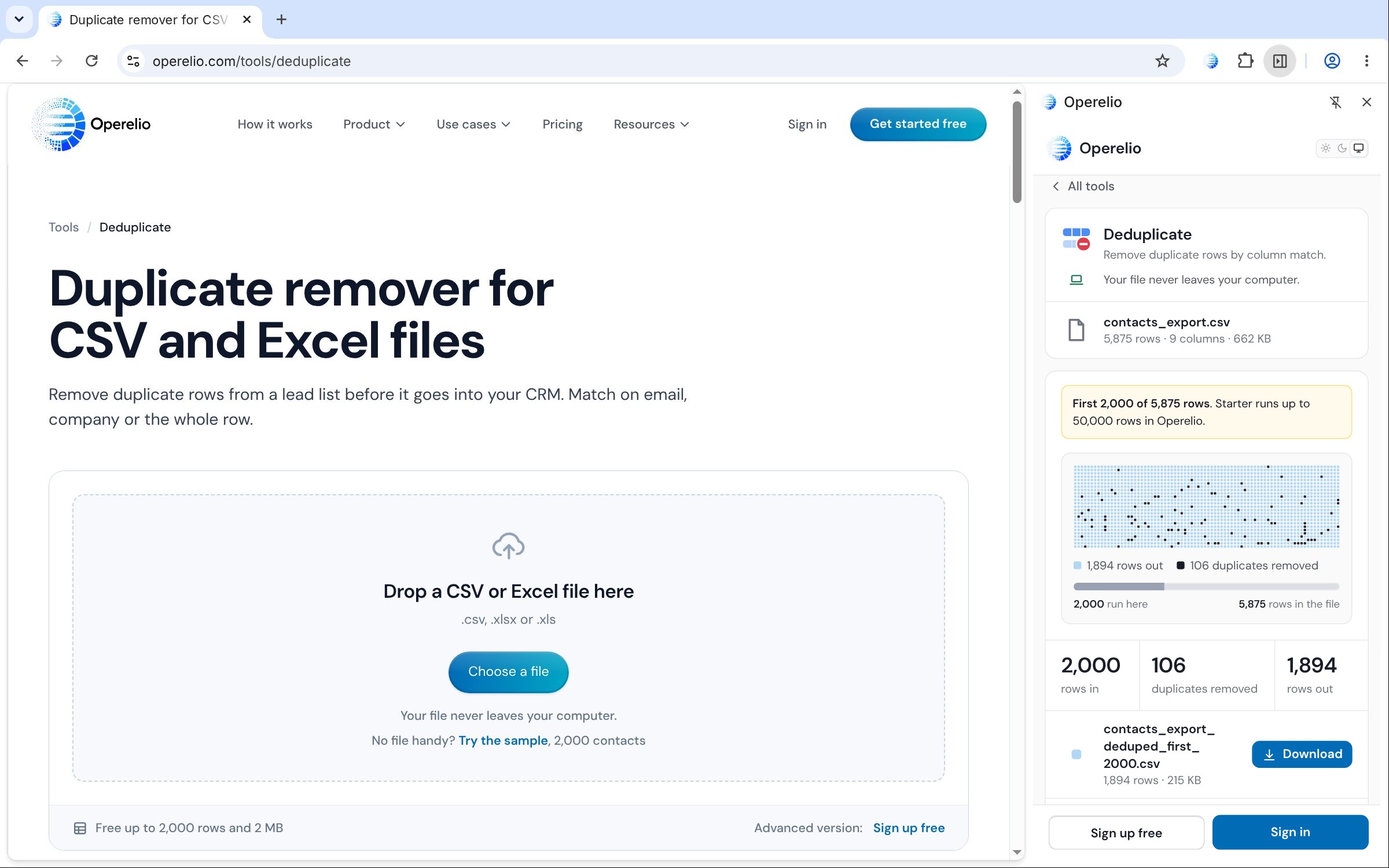
The panel takes files up to 2 MB and 2,000 rows, on every plan. A longer file runs its first 2,000 rows, and a bigger one doesn't run in the panel. Either way the panel offers Run the advanced version in Operelio, which opens the tool with the whole file loaded: up to 25 MB and 50,000 rows on Starter.
On Starter, Pro and Agency
Send a file where it belongs, and follow it into your CRM.
Paid plans add Send and Activity tabs beside Tools. Drop or choose files, see each file's rows and columns, then pick where they go: Files, a folder or a quick tool. Every other way into Operelio is on the integrations page.
- Into your CRMAfter a send to a folder a trail watches, the panel follows the file: uploaded, saved in the folder, the trail's run, and the rows into HubSpot, Salesforce or Pipedrive.
- Quick toolsExcel to CSV (with a tab picker), CSV to Excel, and Merge Files for two or more files run in Operelio. The result downloads and is saved in Files.
- Any other toolOpen in Operelio opens it in a tab with the file loaded.
- Needs youThe Send tab opens on the runs that were held or failed since you last opened the panel.

- ActivityYour workspace's feed, with the same status words as the app. Switch between Mine and Everyone, or open a row to see its run.
- The toolbar badgeThe Operelio button counts the runs that failed, were held or stopped since you last opened the panel.
- Tell me when my runs finishTurn this on at the foot of Activity for a notification when a run you started from the panel finishes or fails.
- Drag it widerDrag the panel's edge to widen it. With enough room it goes to two columns, with Send beside Activity.

- Each client's file, in that client's workspaceOn Agency the header shows which workspace a file is going to. Switch clients in the panel, and your open Operelio tabs switch too. More on Operelio for agencies.
- The wrong-client warningWhen a file's name names another client in your agency, the panel says so and offers to switch before you send it.

Plans
What the panel does signed out, on Free, and on a paid plan.
The tools in the panel are the same for everyone. A paid plan adds what happens after. Prices are on pricing.
| Signed out | Free | Starter, Pro, AgencyFrom $39 a month | |
|---|---|---|---|
| 13 tools in the panel, on your computer | Yes | Yes | Yes |
| Bigger files, in Operelio | Sign up, then pick a plan | Pick a plan | Starter: 25 MB, 50,000 rows. More on Pro and Agency |
| CRM Formatter, Email Verifier & Finder | Sign up, then in Operelio | In Operelio | In Operelio |
| Company Active Check, Workflow Builder | Needs Starter | Needs Starter | In Operelio |
| Send tab: Files, folders and quick tools | No | No | Yes |
| Activity tab | No | No | Yes |
| Notifications and the toolbar badge | No | No | Yes |
| Workspace switcher | No | No | On Agency |
| Wrong-client warning | No | No | On Agency |
Privacy
Your file stays on your computer until you send it.
What the extension reads, what it keeps on your device and every permission it asks for are in our privacy policy.
The 13 tools read your file inside the panel and send it nowhere. The result is written to your computer when you press Download.
A file goes to your workspace only when you press Send, Open in Operelio or Run the advanced version in Operelio. On the Send tab, Excel to CSV uploads a workbook as soon as you pick it, to list its tabs.
The extension runs on no web page, reads no page content and has no analytics.
Questions
Questions about the extension
Which browsers does it work in?
The Operelio extension works in Chrome, Edge, Firefox and Opera. In Chrome, Edge and Opera, the Operelio button in the toolbar opens the side panel. In Firefox, open Operelio from the sidebar menu. Each store above shows Coming soon until its listing is live.
Which files can each tool take?
Excel to CSV takes .xlsx and .xls files, and CSV to Excel takes .csv. The other 11 take .csv, .xlsx or .xls, and from a workbook you pick the tab. Each file can be up to 2 MB and 2,000 rows in the panel.
Do I sign in to the extension separately?
No, the Operelio extension uses the session you're signed in with on operelio.com. Signed out, the tools still run.
Add the panel to your browser.
13 tools on your computer, free and with no account. Add a paid plan when you want files sent on to Operelio and into your CRM.
- FirefoxComing soon
- OperaComing soon