
Lead scoring: how to build a lead scoring model
Lead scoring gives each lead points for the things that make it likely to buy, adds them up, and uses the total to decide who sales calls first. A model has two halves: fit, meaning who the lead is (job title, company size, industry), and engagement, meaning what they've done (a demo request, a pricing page visit, an email reply). The score is only as good as the record under it, so check the email works and the lead isn't a duplicate or an existing customer before you score it.
By Operelio team · Updated October 21, 2026
On this page13
- 1.What is lead scoring?
- 2.Lead scoring models: fit, engagement and predictive
- 3.Clean the data before you score it
- 4.How to build a lead scoring model, step by step
- 5.Lead scoring criteria examples
- 6.Engagement criteria examples
- 7.Lead scoring example: one lead, line by line
- 8.Negative lead scoring
- 9.Lead score decay
- 10.Lead scoring in HubSpot, Salesforce and Pipedrive
- 11.Score leads at intake, before they reach the CRM
- 12.Do you need lead scoring software?
- 13.Frequently asked questions
What is lead scoring?
Lead scoring is a points system for leads. You decide which facts about a lead make it more or less likely to become a customer, give each one points, and add them up. A Director of Operations at a 300-person company who asked for a demo ends up near the top. A student on a Gmail address who downloaded one ebook ends up near the bottom. Sales works the list from the top.
Scoring and qualification get used as if they were the same thing. A score ranks leads. Qualification is the yes or no decision about whether a lead is worth a salesperson's time, made partly from the score and partly from a conversation. Our lead qualification how-to covers that decision, with BANT and the questions to ask.
Lead grading is a third word you'll meet, mostly from Salesforce's Account Engagement (formerly Pardot). There, the score measures interest from what a prospect has done, and the grade, from A+ to F, measures how well they match the profile you sell to. HubSpot, for one, shows both: fit and engagement scores, apart or combined.
Lead scoring models: fit, engagement and predictive
Fit scoring, also called explicit scoring, reads what the lead or the data tells you about them: job title, seniority, company size, industry, country, the tools they use. It answers "is this the kind of person and company we sell to?" Fit barely changes over time. A VP at a 500-person logistics firm is the same fit next month.
Engagement scoring, also called implicit or behavioral scoring, reads what the lead has done: pages visited, emails opened and clicked, forms filled, webinars attended, a demo booked. It answers "are they interested right now?" It needs tracking (a marketing automation tool, website analytics) and it goes stale, which is why engagement points usually decay.
A combined model keeps the two apart and reads them together. HubSpot does this with labels from A1 to C3: "The letters refer to the fit score values where A is high-fit and C is low-fit. The numbers refer to engagement score values, where 1 is high engagement and 3 is low engagement." An A3 is the right company that hasn't done much yet, so marketing nurtures it. A C1 is very active but the wrong fit, so it may be a student or a competitor doing research.
Everything above is rules-based: a person picks the rules and the points. Predictive scoring, sold as AI lead scoring, works the other way round. A model looks at which past leads converted and which didn't, finds the patterns itself, and scores new leads against them. It can find signals nobody thought to write a rule for. It needs history to learn from, though: Salesforce's Einstein Lead Scoring wants at least 1,000 leads created in the last 200 days, at least 120 of them converted, and HubSpot's AI scores need at least 50 contacts, 25 converted and 25 not. Below that, Einstein falls back to a global model built from many Salesforce customers' anonymous data, which knows nothing about your market.
So for most small and mid-sized teams, start with rules. You can explain every point to a sales rep who asks why a lead scored 85, and you can change a rule the day you learn it's wrong. Move to predictive once you have a year or two of clean conversion data.
Clean the data before you score it
Every scoring model assumes the fields it reads are right. Often they aren't, and a bad record scores as well as a good one. Salesforce says as much about its own model: "Encourage reps to add as much data to their leads as possible. When leads have more data, Einstein Lead Scoring generates better insights." The same goes for rules you write yourself.
Say a demo request comes in from a Head of Revenue at a 400-person software company. It scores 90 and goes straight to a rep, who calls and finds the company has been a customer for three years. The person filled in the form with a personal address, so the CRM made a new contact instead of matching the one it had. Nothing in the score could have caught that. A lookup against the CRM before scoring would have.
By hand, that means an export of your CRM's contacts and companies, a lookup of each new lead's email and domain against it, an email checker, and a duplicate check on the list. Our CRM data quality how-to covers the wider cleanup.
Run these checks first:
Verify the email
A bounced or invalid address can't be worked, however well the rest of the record scores. Take points away for it, or hold the lead.
Remove duplicates
The same person twice gets scored twice, routed twice and called twice. Dedupe a list by email before it's imported.
Match against the CRM
Look each lead up by email and by company domain: already a contact, already a customer, a new person at a company someone owns. Those go to the existing owner, not the top of the queue.
Fill or flag the fields your rules read
A rule on company size scores nothing on a blank cell. Know which fields are often empty, and decide whether a blank scores zero or holds the lead for a look.
How to build a lead scoring model, step by step
Seven steps. The first two are research, the middle three are the model, and the last two decide what the score does and keep it honest.
Look at the deals you won
Pull last year's closed-won deals and list what the contacts and companies had in common: titles, company sizes, industries, regions, where they came from, what they did before the first call. Then do the same for closed-lost and for leads that never answered. The differences between the lists are your rules.
Pick your fit attributes
Choose four to eight facts you can read from the record, such as job title, company size and industry. Use only fields that are filled in on most leads, or the rule mostly scores blanks.
Pick your engagement signals
Choose the actions that came before a sale in your won deals: a demo request, a pricing page visit, a reply to an email. Weight the ones that show buying intent over ones that show reading.
Assign points
Give the strongest signals the most points and keep the scale simple: 5, 10, 20 and 30 is easier to reason about than 7, 13 and 22. A useful check is that no single weak signal, like one email open, can push a lead over your sales threshold on its own.
Add negative points
Take points away for what rules a lead out: a competitor's domain, a student, a free email address when you sell to businesses, an unsubscribe. The next section lists them.
Set thresholds and what each does
Decide which scores go to sales now, which go to marketing to nurture, and which are dropped or held. Write the action next to each band, such as 70 and over to sales within a working day, 40 to 69 to nurture, under 40 held.
Test it on last quarter's leads, then review it monthly
Score last quarter's leads with the new model and check the leads that became customers landed near the top. If good leads scored low, a rule is missing; if junk scored high, a rule is too generous. Then review the model every month for the first quarter and every quarter after that, and ask sales which high scores wasted their time.
Lead scoring criteria examples
Here are B2B examples for a company selling software to mid-sized businesses. The points are a starting place, not a standard: change them to fit what your won deals showed.
Fit criteria:
| Criterion | Points | Why |
|---|---|---|
| Title includes VP, Head of or Director | +25 | The people who sign or champion a purchase |
| Title includes Manager | +10 | Often the daily user who brings it to their boss |
| Company has 50 to 1,000 employees | +20 | The size range most of the won deals came from |
| Company has more than 1,000 employees | +10 | Good deals, but slower and less frequent |
| Industry is one you have customers in | +15 | Your case studies and references fit them |
| Country is one you sell to | +10 | You can contract, invoice and support them |
| Phone number present | +5 | Sales can call, not only email |
Engagement criteria examples
Engagement criteria, from the same company:
| Criterion | Points | Why |
|---|---|---|
| Requested a demo or a call | +30 | The clearest buying signal there is |
| Visited the pricing page | +15 | Comparing costs usually comes before a purchase |
| Attended a webinar or event | +10 | Gave up an hour, so the problem is real to them |
| Replied to a sales email | +10 | A two-way conversation has started |
| Downloaded a guide or template | +5 | Interest in the topic, not yet in buying |
| Opened a marketing email | +1 | Weak on its own: an open isn't a read |
Lead scoring example: one lead, line by line
Nadia Ferreira, Head of Sales Operations at Larkspur Freight (220 employees, logistics, US), requested a demo after visiting the pricing page twice and opening two emails, from nadia.ferreira@larkspurfreight.example. Fit: Head of +25, 220 employees +20, logistics is an industry with customers +15, US +10, no phone 0, so 70. Engagement: demo request +30, pricing page +15 (counted once), two email opens +2. Total 117, so the lead goes to sales the same day.
Compare a lead with the same demo request from a student at a university on a Gmail address: demo request +30, student -30, free email domain -15, so -15. The demo request alone didn't carry them, which is the point of negative scoring.
Negative lead scoring
Negative points do as much work as positive ones. Without them, a lead that does a lot of reading looks like a buyer. Common B2B negatives:
Free email domain: -15
A Gmail, Outlook or Yahoo address when you sell to businesses. Don't use it if many of your buyers are freelancers or very small firms.
Student, intern or job seeker: -30
Read from the job title. They're researching, not buying.
Competitor's domain: -50
Or hold the lead outright, so it never reaches a rep.
Email bounced or invalid: -50
Nobody can work it until the address is fixed.
Unsubscribed from email: -20
They asked you to stop. Respect it in the score as well as in the sending.
Outside the countries you serve: -20
You can't sell to them yet, however good the fit.
Lead score decay
Score decay takes engagement points away as time passes, so a lead who was busy in March doesn't still look hot in September. HubSpot's version: "Score decay intervals can be set to every 1, 3, 6, or 12 months", and each event decays on its own, so a 10-point form fill set to lose 50% a month is worth 5 points a month later. If your tool has no decay, a simpler rule works: only count actions from the last 90 days.
Fit doesn't decay. A Director at a 300-person company is the same fit in a year, unless they change jobs. What goes stale there is the data: people move roles and companies grow, so re-check fit fields on old leads before you score them again.
Lead scoring in HubSpot, Salesforce and Pipedrive
Each CRM has scoring built in, but on different plans and for different records. Facts from each vendor's own help pages, read October 21, 2026 (Salesforce on October 20).
HubSpot: lead scoring is listed for Marketing Hub Professional and Enterprise and Sales Hub Professional and Enterprise; Starter isn't listed. Contacts take scores with Marketing Hub, companies with Marketing Hub or Sales Hub, and deals with Sales Hub, where scores are combined only. Engagement and fit scores are labeled High, Medium and Low, combined scores A1 to C3, and rules can "add or subtract points". AI scores need Marketing Hub Enterprise.
Salesforce: Einstein Lead Scoring is "available in Performance and Unlimited Editions, and for an extra cost in Enterprise Edition", needs the data volumes in the models section above, and "reanalyzes your lead data every 10 days and refreshes your scores". Rules-based points and A+ to F grades are in Account Engagement, a separately licensed product. Its default points include +50 for a form submission, +1 for a page view and -5 for a form error.
Pipedrive: Scores are "available on Premium and higher plans", and "currently, you can only choose deals", not leads in the Leads Inbox or people. Criteria fall into three groups worth fixed points (Highly positive +25, Slightly positive +10, Negative -10), you can "set up to 10 criteria in total", and only deal and activity fields can be used. The result is shown on a scale of 0-100.
Side by side:
| HubSpot | Salesforce | Pipedrive | |
|---|---|---|---|
| Native scoring | Lead scoring tool | Einstein Lead Scoring; points and grades in Account Engagement | Scores |
| Plan or edition | Professional or Enterprise | Performance and Unlimited, or Enterprise for an extra cost | Premium and higher |
| What it scores | Contacts, companies and deals | Leads (Einstein); prospects (Account Engagement) | Deals only |
| Fit and engagement | Both, apart or combined | Einstein learns from your fields; Account Engagement scores activity and grades fit | Deal and activity fields |
| Decay and refresh | Decay every 1, 3, 6 or 12 months | Einstein refreshes every 10 days | Recalculated when deal data changes |
| Predictive | AI scores on Marketing Hub Enterprise | Einstein, with 1,000 leads and 120 conversions in 200 days | No; points from criteria you set |
Score leads at intake, before they reach the CRM
If your plan has no native scoring (HubSpot Starter, Salesforce without Einstein or Account Engagement, Pipedrive below Premium, or Pipedrive for anything before it's a deal), you have two routes. Keep a score in a number field you set with a formula or a workflow your plan allows, or score the leads before they reach the CRM.
CRM scoring starts once the record exists. By then a junk lead is already a contact, maybe with a task on a rep's list. Scoring at intake means the score is set while the lead is on its way in, so a lead that scores 1 can be held back before it becomes a record anyone has to deal with. It also covers what CRM scoring often misses: event lists, bought lists and spreadsheets someone imports.
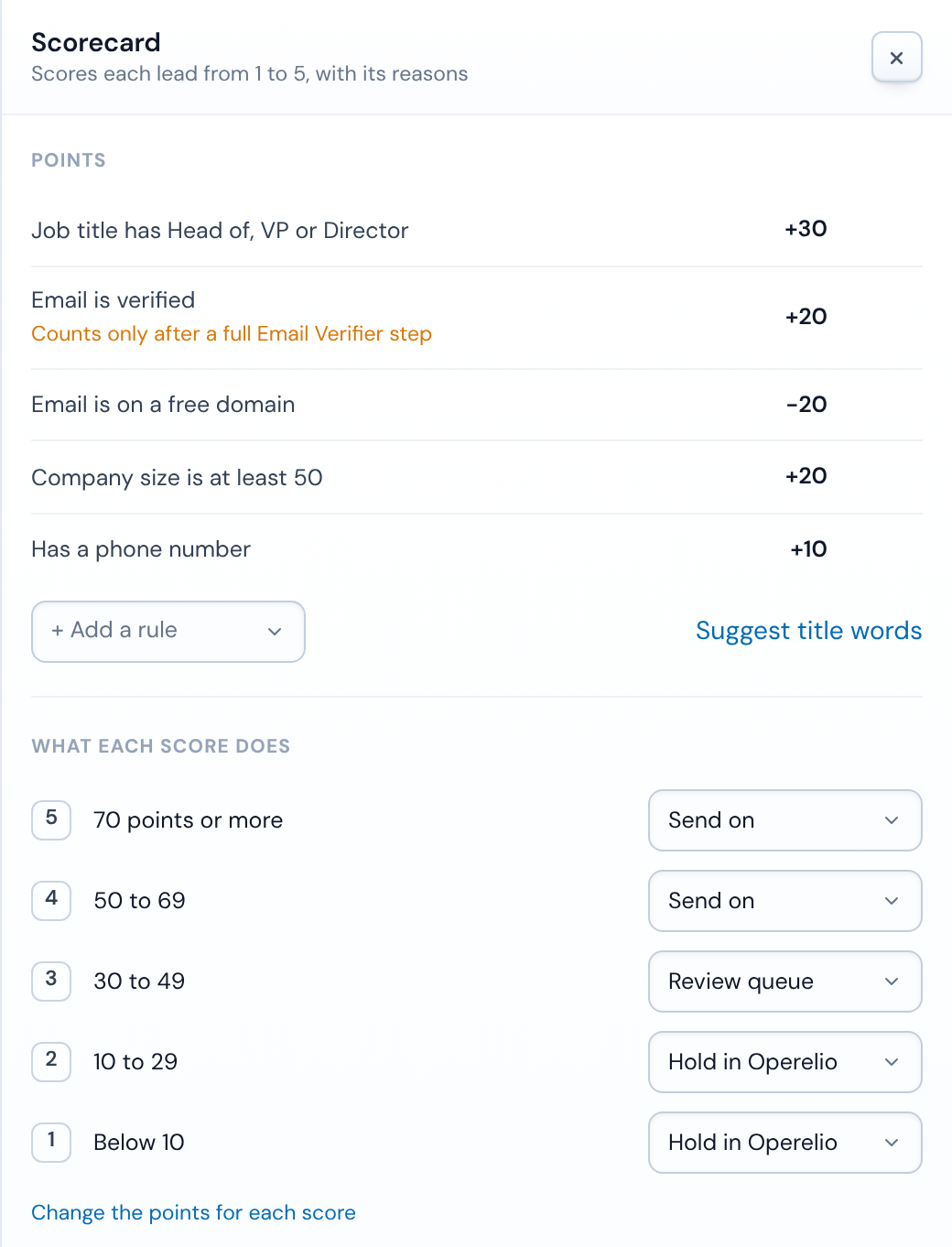
In Operelio, that's a trail's Scorecard. You give each rule points, from -100 to 100, and the total falls into a score from 1 to 5, at the point bands you choose. Rules can match words in the job title, check that a column has a value, check that the email verified, spot a free email domain, or test any column with the same conditions as the filter step, such as "company size is at least" 50. Bridgeant can suggest title words and columns from your column names, never from the values in your cells, and you approve each rule.
Each score has an action: keep it and send it on, send it to review, where someone says yes or no, hold it in Operelio, drop it, or hand it to the trail's routing rules. By default 1 and 2 are held, 3 waits for review, and 4 and 5 go on. Routing rules can also send a lead on by its score, for example 5 to a senior rep and 4 shared out in turn.
Lists and single leads are scored the same way, with one difference in what runs before the score. A list can go through Verify emails, Company Active Check and Deduplicate first. A single lead sent to a folder's webhook (from Zapier, Make or your own code), straight from Typeform, or by email runs the trail's own steps and the Scorecard but none of those three, so an email verified rule adds points only on lists that ran Verify emails. Typeform can send each response straight to a folder, and each response becomes one lead, so a test response from Typeform makes a real lead too. A test run on one of your own files shows what the Scorecard did with the rows, how many were kept, sent to review, held or dropped, before the trail is live.
For single leads into HubSpot or Salesforce, each score can set the lifecycle stage or the Lead Status, and if you turn deals on, one is made for scores 4 and 5 by default, never below 3. A HubSpot lifecycle stage only moves forward, and a Salesforce Lead Status is set only on a Lead the push creates. Pipedrive takes lists from a trail, not single leads yet.
What the Scorecard doesn't do: it scores the columns a row arrives with, so it's fit scoring plus whatever a column carries, such as a Source or Event column. It doesn't see page views, email opens or form history, it has no decay and no predictive model, and it doesn't write the number into a CRM field. So the honest split is this: score fit at the door with the Scorecard, and let your CRM's own scoring add engagement once the lead is in.
Do you need lead scoring software?
Usually not at first. If your CRM plan includes scoring and your leads arrive through forms the CRM tracks, its own tool is the right place: it sees the engagement, and the score sits on the record where reps work.
A separate tool earns its place in three cases. Your plan has no scoring and the upgrade costs more than the problem. A lot of your leads arrive as files and inbox emails, which CRM scoring sees only after they've been imported. Or you want bad leads stopped before they become records, not ranked low once they're in. In the first case a spreadsheet model is a fine start; in the other two, score at intake.
Related
Frequently asked questions
What is a good lead score?
There's no universal number. A good score is one that sits above the threshold you set for sales, on a scale you built from your own won deals. Check it works by looking at last quarter: most leads that became customers should have scored above that line, and few that scored above it should have been junk.
How often should you update your lead scoring model?
Monthly for the first three months, then quarterly. Each time, look at high-scoring leads that sales rejected and low-scoring leads that bought anyway, and change the rule that let each one through. Change it sooner when you launch a product, enter a market or change who you sell to.
Can you score leads in Excel?
Yes. Put one column per rule that returns its points, such as =IF(ISNUMBER(SEARCH("director",C2)),25,0) for a title rule, and a total column that adds them up. Sort by the total, or add a column that turns the total into hot, warm and cold. It works well for event lists and bought lists, and for testing a model before you build it in a CRM.
What's the difference between lead scoring and lead grading?
In tools that keep them apart, such as Salesforce's Account Engagement, the score measures interest from what a lead has done, and the grade measures how well they fit the profile you sell to, from A+ to F. HubSpot's combined score does the same with letters for fit and numbers for engagement, A1 to C3.
Ready to get started?
Upload a file and run your first transformation. Free, no credit card required.