
Lead qualification: steps, BANT and a checklist
Lead qualification is deciding whether a lead is worth a salesperson's time. It has two halves: fit, meaning the lead looks like the companies and people you sell to, which the data can answer, and readiness, meaning they have a need, a budget and a reason to act now, which mostly takes a conversation. Check the record is real before either. Then record the answer where your team works: the lifecycle stage and Lead Status in HubSpot, Lead Status and Convert in Salesforce, or the Leads Inbox in Pipedrive.
By Operelio team · Updated October 21, 2026
On this page12
- 1.What is lead qualification?
- 2.MQL vs SQL (and SAL, PQL)
- 3.Check the lead is real first
- 4.The lead qualification process, step by step
- 5.BANT lead qualification
- 6.Other lead qualification frameworks: MEDDIC, CHAMP and more
- 7.Lead qualification questions to ask
- 8.Where lead qualification lives in your CRM
- 9.Automated lead qualification: what a rule can decide
- 10.Worked example: scoring a trade show list
- 11.Lead qualification checklist
- 12.Frequently asked questions
What is lead qualification?
HubSpot's definition is a good one: "Lead qualification is the process of determining whether a lead or prospect is a fit for a product or service." In practice it ends in a yes or a no for each lead, and a yes means a salesperson spends time on them.
Lead scoring is related but different. A score is a number that ranks leads by how well they fit and how interested they seem. Qualifying is the decision you make, partly from that number and partly from talking to the person.
Three words get mixed up. A lead is anyone who has come into your CRM: a form fill, a badge scan, a row on a bought list. A prospect is a lead you've decided to pursue. An opportunity, or deal, is a prospect with a real chance of buying, tracked with a value and a close date. Qualification is what moves a lead from the first to the second, and from the second to the third.
MQL vs SQL (and SAL, PQL)
Most teams qualify twice: once by marketing, from what the lead has done, and once by sales, from talking to them. The four terms below are HubSpot's, from its guide to sales qualification (June 2026) and its sales qualified lead page (July 2026).
A marketing qualified lead (MQL) "is a prospect who has shown enough interest in a product or service to warrant marketing attention, but isn't yet ready for a direct sales conversation." A sales qualified lead (SQL) "is a prospect who's been vetted and deemed ready for a direct conversation with sales."
Between them sits the sales accepted lead (SAL): "the formal handoff point at which the sales team reviews marketing-generated leads and agrees they meet the minimum criteria to pursue." A product qualified lead (PQL) is "a prospect who has already experienced meaningful value from a product, typically through a free trial or freemium plan."
In HubSpot the default lifecycle stages run Subscriber, Lead, Marketing Qualified Lead, Sales Qualified Lead, Opportunity, Customer, Evangelist and Other, so MQL and SQL are stages you can set on a contact. HubSpot has no default SAL or PQL stage, but you can add your own stages.
| Type | Who decides | What usually signals it | What happens next |
|---|---|---|---|
| MQL | Marketing | Fit plus activity: a content download, a webinar, repeat visits | Marketing nurtures it, or passes it to sales |
| SAL | Sales, at the handoff | It meets the criteria both teams agreed | A rep reaches out to qualify it |
| SQL | Sales, after contact | A need, a decision-maker and a reason to buy, from a conversation | A deal or opportunity is opened |
| PQL | Product use | The person used a free trial or free plan and got something from it | Sales talks to them about paying |
Check the lead is real first
Every framework assumes the lead in front of you is a real person you don't already know. Often it isn't. HubSpot's own list of SAL criteria includes "Contact information is accurate and complete" and "There's no active opportunity already in progress for that account", yet most qualification advice skips straight to the discovery call.
Say a rep picks up a demo request from a Director of Operations, books a call, and spends 20 minutes on discovery before learning the company has been a customer for two years and its account manager was on a renewal call that week. Nothing on the record said so, because the form came in on a personal address and made a new contact. A lookup by email and by company domain before the call would have caught it.
By hand, export your CRM's contacts and companies and look up each new lead's email and domain with XLOOKUP, as the VLOOKUP in Excel how-to shows, and run the list through an email checker. Our CRM data quality how-to covers the wider clean-up.
Run these checks before anyone scores or calls the lead:
The email works
Verify it, so a bounce doesn't pass as a quiet lead. A role address like info@ or a disposable domain tells you something too.
The person isn't already in your CRM
Look them up by email. An existing contact gets updated, not created twice.
The company isn't already a customer or someone's open account
Look the company up by its domain and name, and send the lead to whoever owns that account.
The row is a person who might buy
Take out test entries, your own staff, competitors, students and job seekers.
On a list, each person appears once
Remove duplicates by email before anything is imported.
The lead qualification process, step by step
Six steps, from deciding who you want to recording what you decided. The first three can run on every lead the moment it arrives. The last three need a person.
Inbound and outbound lead qualification differ at the start. An inbound lead raised their hand, so you know their interest and need to check their fit. An outbound lead was picked for their fit, so you know who they are and need to find out whether there's any interest. Event lists and bought lists go through steps 2 and 3 in bulk, a whole file at a time, before anyone picks up the phone.
Define fit
Write down your ideal customer profile: industries, company size, regions, and the job titles that buy or sign. If you can't write it down, you can't qualify against it.
Check the data
The checks in the section above: a working email, no duplicate, no existing customer or owned account, no junk rows.
Score fit and interest
Give points for what matches your profile and for what the lead has done, and decide which scores sales sees.
Hand the high scores to sales
Give each one an owner and a time to follow up. The rest stay with marketing.
Qualify in a conversation
Use a framework such as BANT to find out what the data can't tell you: the need, the budget, who decides and when.
Record the outcome, and recycle the no's
Set the status in your CRM, with a reason when it's a no. A bad-timing no today can be a yes next quarter.
BANT lead qualification
BANT stands for Budget, Authority, Need and Timeline. It's still the framework most teams start with, because each letter is one thing to find out.
Some letters can be answered from data before the call. Authority comes partly from the job title, and Need partly from where the lead came from and what they asked for. Budget and Timeline almost never can: they come from a conversation. That split is why the automated half of qualification is about fit and the human half is about readiness.
The four letters, with questions that get at each:
Budget
Can they pay for it? Ask: "Is there budget set aside for this, or would it need to be found?" and "What do you spend on this problem today?"
Authority
Who signs? Ask: "Who else will be involved in choosing?" and "How have you bought something like this before?"
Need
What problem would it solve? Ask: "What made you look at this now?" and "What happens if you don't fix it this year?"
Timeline
When would they buy? Ask: "When do you need this working?" and "Is anything tied to that date, like a contract ending?"
Other lead qualification frameworks: MEDDIC, CHAMP and more
Other frameworks reorder or extend the same ideas. The letters below are as HubSpot's guide gives them.
| Framework | Letters | Best for |
|---|---|---|
| MEDDIC | Metrics, Economic Buyer, Decision Criteria, Decision Process, Identify Pain, Champion | Large, complex deals with several people deciding. Developed at PTC. |
| CHAMP | Challenges, Authority, Money, Prioritization | Sales that start from the prospect's problem rather than their budget |
| GPCTBA/C&I | Goals, Plans, Challenges, Timeline, Budget, Authority, Negative Consequences, Positive Implications | Products tied to a buyer's wider plans. HubSpot says it was developed there. |
| ANUM | Authority, Need, Urgency, Money | BANT reordered to find the decision-maker first |
| FAINT | Funds, Authority, Interest, Need, Timing | Purchases nobody planned or budgeted for. Advocated by RAIN Group. |
Lead qualification questions to ask
Twelve questions that work on a first call, grouped by what they find out. Ask them in your own words, and stop asking once you have the answer.
| Finds out | Question |
|---|---|
| Fit | What does your team do, and how many people are on it? |
| Fit | Which tools do you use for this today? |
| Fit | Who are your customers? |
| Need | What made you get in touch now? |
| Need | What does this problem cost you each month, in time or money? |
| Need | What have you tried so far, and why didn't it stick? |
| Authority | Who else would use this, and who would sign off on it? |
| Authority | What does your buying process look like for something this size? |
| Budget | Is there budget for this already, or would you need to make a case for it? |
| Timing | When would you want this working? |
| Timing | Is anything driving that date, like a renewal, a hire or a launch? |
| Next step | If this looks right after today, what would you need to see next? |
Where lead qualification lives in your CRM
HubSpot has three places, and teams often use all of them. The lifecycle stage says how far along a contact or company is: "Marketing Qualified Lead: a contact or company that your marketing team has qualified as ready for the sales team", and "Sales Qualified Lead: a contact or company that your sales team has qualified as a potential customer. This stage includes sub-stages that are stored in the Lead Status property." Lead Status's defaults are New, Open, In Progress, Open Deal, Unqualified, Attempted to Contact, Connected and Bad Timing. HubSpot's default automatic updates to the lifecycle stage "will only move the stage forward", so a contact won't drop back to an earlier stage on its own. To move it back, clear the value by hand or with a workflow first. The third place is the Leads object, with "a default Lead pipeline with five lead stages: New, Attempting, Connected, Qualified, Disqualified". Managing lead pipelines needs a Professional or Enterprise subscription. Source: HubSpot's knowledge base, updated July and September 2026.
Salesforce keeps unqualified people as Leads. Lead Status is a picklist your admin sets up, and Salesforce's own example values are Open, Contacted and Qualified. Once a lead is qualified, you convert it: Salesforce's help says "Keep the sales process moving when you qualify a lead and then convert it to a contact", with an account and, if you choose, an opportunity. "You can't reverse a lead conversion", so qualify before you convert. For leads you mark Unqualified, Salesforce suggests you "plan to revisit them later".
Pipedrive's Leads Inbox is "a dedicated space to store and organize your unqualified leads". When you've qualified one, you "click 'Convert to deal'" and pick its pipeline, and the lead moves out of the inbox. Lead labels let you mark each lead while it waits. Source: Pipedrive's help, updated September 2026.
Automated lead qualification: what a rule can decide
A rule can decide fit on every lead the moment it arrives: a job title that matches the people who buy, a company over a certain size, an email that verified, a free email domain like Gmail, a company that's already a customer. A rule can't find out whether there's a budget or a deadline. Automating qualification means letting rules sort the fit half so that people spend their calls on readiness.
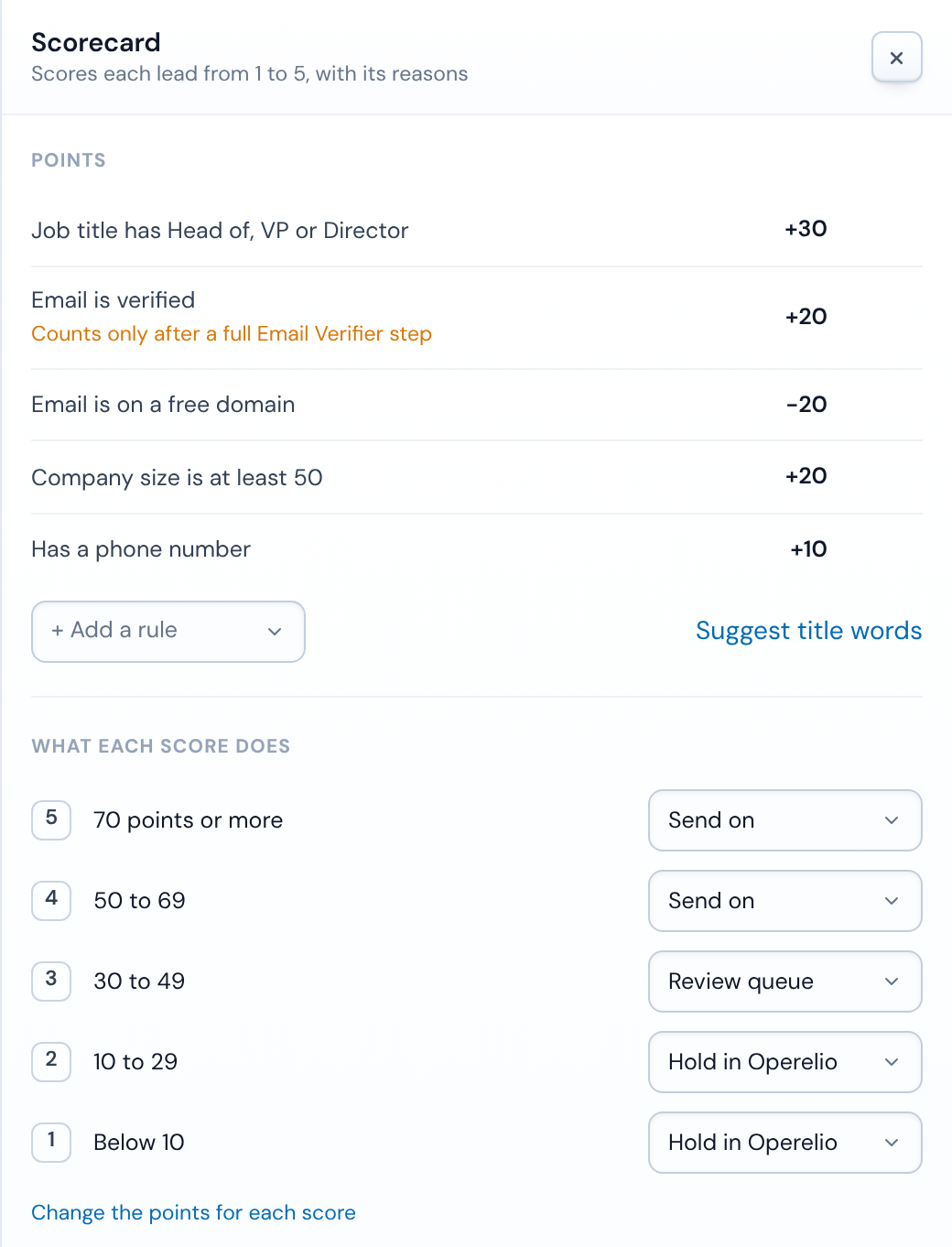
In Operelio, that rule half is a trail's Scorecard. You give each rule points, from -100 to 100, and the points fall into a score from 1 to 5. Rules can match words in the job title, check that a column has a value, check that the email verified, spot a free email domain, or test any column, such as "company size is at least" 50. Bridgeant can suggest title words and columns from your column names and what you tell it about who you sell to, never from the values in your cells, and you approve each rule.
Each score has an action: keep it and send it on, send it to review, where someone says yes or no, hold it in Operelio, or drop it. By default 1 and 2 are held, 3 waits for review, and 4 and 5 go on. A list's rows and a single lead are scored the same way, and rows waiting for review sit in one queue with single leads. In a trail's first week, every single lead waits for a yes or no, so you can see what the card does before it decides alone.
Before the score, a list can go through the Verify emails step and remove duplicates. A single lead sent to the folder's webhook (from Zapier, Make or your own code), straight from Typeform, or by email goes through the trail's steps and the Scorecard, then the CRM check, routing and the push, but not Verify emails, so a verified email rule scores only on lists that ran it. The CRM check marks each lead Already in HubSpot (or Salesforce), New person at an existing company, or New. An existing contact is filled in, never overwritten, and keeps the owner it has. Typeform can send each response straight to a folder, and each response becomes one lead, so a test response from Typeform makes a real lead too.
For single leads into HubSpot or Salesforce, each score can set the lifecycle stage or the Lead Status, and if you turn deals on, one is made for scores 4 and 5 by default, never below 3. The lifecycle stage only moves forward, and Salesforce's Lead Status is set only on a Lead the push creates. Pipedrive takes lists from a trail, not single leads yet.
Worked example: scoring a trade show list
Here's a five-rule card on a trade show list, with 2 starting at 10 points, 3 at 30, 4 at 50 and 5 at 70:
Job title has Head of, VP or Director: +30
The people who sign.
Email verified: +20
Read from the Verify emails step.
Free email domain: -20
A Gmail or Outlook address on a business list.
Company size is at least 50: +20
Your smallest customer.
Has a phone: +10
Someone can call them.
| Name | Title | Size | Phone | Points | Score | Then | |
|---|---|---|---|---|---|---|---|
| Mara Quenby | VP Operations | mara@harrowfield-logistics.example, verified | 220 | Yes | 80 | 5 | Goes on |
| Joel Arkwright | Director of Sales | joel@brindlemoor.example, verified | 40 | No | 50 | 4 | Goes on |
| Priya Nandi | Marketing Manager | priya@tallis-and-co.example, verified | 120 | No | 40 | 3 | Waits for review |
| Sam Okafor | Head of Growth | sam.okafor@gmail.example, verified | No | 30 | 3 | Waits for review | |
| Dev Rana | Coordinator | dev@quenby-tools.example, not valid | 15 | Yes | 10 | 2 | Held |
| Lucy Hale | Student | lucyhale@gmail.example, verified | No | 0 | 1 | Held |
Mara's 80 points make a 5 and Joel's 50 a 4, so both go on. Priya and Sam score 3 and wait for review: Sam has the right title on a Gmail address. Lucy and Dev are held. None of it says whether Mara has a budget. That's still the first call's job.
Lead qualification checklist
Copy this into your team's playbook. The first six are about the data and can run on every lead. The rest are for the person who talks to them.
Your ideal customer profile is written down
Industries, company size, regions and buying titles.
The email verified
Not a bounce, a disposable address or a typo.
The person isn't already in the CRM
Looked up by email.
The company isn't a customer or someone's open account
Looked up by domain and name, and sent to the owner if it is.
The row is a real prospect
Not a test, a colleague, a competitor or a job seeker.
The lead has a fit score and an owner
And a time by which the owner follows up.
You know the need
In their words, and why it matters now.
You know who decides
And who else will be involved.
You know whether there's budget
Set aside already, or still to find.
You know the timeline
And what's driving it.
The outcome is in the CRM
Lifecycle stage, Lead Status or a converted deal, with a reason on a no.
The no's have a date to revisit
Bad timing today isn't a no forever.
Related
Frequently asked questions
Who should qualify leads, marketing or sales?
Both, at different points. Marketing qualifies on fit and activity and decides which leads are ready to pass on. Sales qualifies in conversation and decides which become deals. Agree the handoff criteria in writing, so a lead sales sends back comes with a reason.
How long should qualifying a lead take?
The data checks and the fit score can be done as the lead arrives. The conversation half is usually one discovery call, sometimes two for a large deal. After that, the work is selling to a qualified lead.
What do you do with unqualified leads?
Record why, and keep them. Salesforce's help suggests you plan to revisit leads marked Unqualified to see whether their needs changed. In HubSpot, Lead Status has Unqualified and Bad Timing for this. Send them back to marketing, and look again when something changes, such as a new job title or a return visit.
Is BANT outdated?
Its four questions still matter, but asked in that order on a first call they can feel like an interrogation, and budget is often the last thing a buyer knows. Many teams start with need, as CHAMP does, and use BANT as a checklist of what to have found out by the end of the call.
Ready to get started?
Upload a file and run your first transformation. Free, no credit card required.