

The short version
- Lead automation is worth doing for any business, but combining several data sources is where it goes wrong.
- Merge your sources into one table before deduplicating. Deduplicating each provider's file separately finds nothing, because the duplicates only exist between them.
- No similarity threshold on a company name alone works. Set it high and HubSpot misses HubSpot, Inc.; set it low and Equifax matches Equinix. The row has to settle it.
- Rules handle the decisions with a definite answer and AI handles the ones without. Building that yourself means paying tokens and per-task fees on top of the work.
In this article10
Lead automation is the automated flow of lead data into your CRM without anyone importing it by hand. A list arrives from a data provider, a form fill or an export, it gets cleaned and formatted on the way, and it lands in your CRM as records your team can work.
None of that is revolutionary. Workflow builders like Zapier and n8n have made it possible to pipe data straight into a CRM for years. What has changed is how much data businesses pull now, and from how many places at once. That's where these workflows start to break.
It breaks in three places. Matching the same company when it turns up in more than one source. Working out what wins when those sources disagree. And the one nobody plans for: what happens when all of it lands on top of the records already in your CRM.
Why businesses automate lead flow
- Accessibility. Quicker than importing by hand, and it means non-technical CRM users can get data in.
- Errors. Takes out the mistakes that come from a person mapping columns and pasting them into an import template by hand.
- Multiple sources in one place. Most teams are pulling from several places at once now. A couple of data providers, the website form, a list someone bought for an event, an export somebody pulled out of the old CRM. A workflow that takes a provider like ZoomInfo straight into your CRM, along with everything else coming in, gives you one consistent flow instead of the import problem.
- Speed. Data gets to where it needs to go quicker. A sales rep needs data in their CRM by Monday morning to go outbound, or an inbound lead comes in over the weekend and needs picking up first thing.
Automated doesn't have to mean instant, which catches people out. Most of these flows run on one of two triggers. Either they fire when a file arrives, or they run on a schedule. Arrival suits inbound, where a lead sitting for six hours is a lead someone else has already called. A schedule suits bought lists, where you'd rather the whole file went through one set of checks together than trickled in row by row.
So with all of the above, it makes sense for a business to automate lead flows, doesn't it?
Short answer: yes, for any business of any size. There is a but though. It has to be done the right way, and that needs a lot more consideration than it usually gets.
If that's the question you actually came with, Should you automate your lead flow? answers it on its own, including what the alternatives cost. The rest of this piece is the right way.
Here is the short version of the right way: rule-based transformation and AI reasoning working as one workflow. Rules handle everything that has a definite answer. AI handles the decisions that don't have one. Neither gets you there alone, and most workflows only ever have the first half.
Where it breaks: combining multiple sources
Each new source you add creates conflicts, and conflicts create bad data.
Say your workflow is set up to pull three data providers into one place, so your outbound team has something to work. Each one sends a list of companies, industries and contacts. All three will overlap, and where they overlap they won't agree, right down to a slightly different format of company name (they do this).
So you have three different company names, all for the same company. If nothing is set up to spot that and collapse them, you flood your CRM with three companies and a set of contacts under each. The failure isn't the import. It's that nothing recognized those three were the same company.
So how do you fix it?
Step one: merge the sources before you do anything else
This is the step people get out of order, and getting it wrong makes everything after it pointless.
You cannot spot that three rows are the same company while those rows are sitting in three separate files. Duplicate checking works inside one table. So the sources have to be combined into a single table first, and only then can anything look across them.
Get this backwards, deduplicate each provider's file on its own, and every file comes back clean. Each one only had the company once. The duplicates only exist between them.
Step two: deduplicate on the company name and on the row
Now you can look for the repeats, and this is where a standard duplicate checker lets you down.
A name with Inc. on the end and the same name without it isn't picked up, because it isn't a 100% match. So you lower the threshold. And the moment you do, you start merging companies that were never the same company.
Here are real company names and the scores a similarity check gives them. The order is what matters: read down the percentages and watch which pairs are the same business.
- Salesforce vs Salesforce, Inc.Same company
- 77%
- Equifax vs EquinixDifferent companies
- 71%
- HubSpot vs HubSpot, Inc.Same company
- 70%
- Braze vs BrexDifferent companies
- 67%
- Cognism vs CognizantDifferent companies
- 62%
- ZoomInfo vs ZoomInfo Technologies LLCSame company
- 48%
Set your threshold at 75% and exactly one row gets through. HubSpot never matches HubSpot, Inc. and you are back where you started. Drop it to 65% to catch that, and you have just merged Equifax with Equinix and Braze with Brex. Four entirely different businesses, collapsed into two, and nobody notices until a rep emails the wrong one.
And the bottom row never gets caught at all. ZoomInfo's registered name scores 48% against the name everybody actually writes, and no threshold low enough to catch that leaves you a file worth pushing.
There is no threshold on the name alone that gets you out of this. Which is why the check has to run on the name and on the row. A company flagged at 67% on name alone is a coin toss, but the same row carrying a matching domain, address or phone number isn't. The row is what settles it.
Step three: collapse them into one record, and decide what wins
Once you know those three rows are the same company, they need to become one, with all the contacts sitting under it.
And that starts the next problem: which information wins?
You now have one company, but provider 2 has different information to providers 1 and 3. So 1 and 3 take priority over 2, and that rule is easy enough to write. Then you hit the split: provider 1 and provider 2 have different values and provider 3 has nothing at all. There is no majority, so there is no rule.
At this point either a person decides, or you need more information before anyone can, like enriching from a fourth source. What you must not do is let it through. The data should be held until there's a ruling, otherwise the automation pushes contradictory data into your CRM and calls it a success.
Held has to mean something though. A held row should sit somewhere a person can actually see it, with the conflict spelled out and the sources named, and somebody should be told it's there. A held row nobody hears about is a lost row, and you find it three months later when a rep asks why a company has no phone number on it.
There's also a difference between a row that's held and a row that failed. A held row is waiting on a decision. A failed row hit something the workflow couldn't process at all: a broken file, or a provider changing their export without telling anyone. Both need to land somewhere you'll look, but only one of them is about your data.
Get these three steps right and the bulk of your data lands in the CRM clean. What doesn't land is sitting somewhere with a reason attached to it, either a flagged duplicate or a contradiction no rule could settle.
That's the right way to do it. You can take it a step further.
Using AI on what the rules can't settle
The point of automation is that nobody has to step in, though sometimes you want them to. So this is where AI joins the workflow and takes on the review of what was held back.
A duplicate, even with similarity matching, is binary. It's a ruling, and a ruling can be written down. Contradictory information isn't binary. It's a choice, and that is exactly the kind of decision a rule can't make and a person shouldn't have to sit and make over and over on every run.
Take the split from step three. Provider 1 says the job title is Head of Revenue Operations, provider 2 says RevOps Manager, provider 3 has nothing. A rule looks at two different strings and stops, because that's all a rule can do. AI gets to look at the rest of the row: the company size, and which provider had the rest of that record right. That's usually enough to pick one.
The important part is that it can also say it doesn't know. A model that just guesses is worse than the rule was, because the rule at least stopped and told you. What you want is something that settles the ones it can settle and hands you the rest.
Do that and the held pile gets a lot smaller, down to the handful that genuinely wanted a person looking at them.
The problem nobody checks: what's already in your CRM
So the import goes through. What nobody checked is the data already sitting in your CRM.
Everything above deduplicated the workflow. None of it deduplicated against the records you already have. So it either lands on top of what's there or arrives as a brand new company, and neither is what you wanted.
A separate check has to happen at the point of import, after the data has been transformed. And this is where the choices matter.
- Do you want to overwrite what's already there? It carries real risk. A contact field that was verified and part of your ICP gets replaced by an unverified value from a provider, and you've made your data worse by automating it. The safe default is to fill in blanks only and leave existing values alone, with overwriting as something you deliberately turn on for a specific job.
- Do you want to drop rows that already exist in your CRM? You can, but it costs you. You've paid credits for that contact and you're throwing the record away. The better answer is usually to match and update rather than create a second copy, so the record improves instead of duplicating.
- And what about the duplicates already in there? Those can be found and listed, but removing them is a different job to importing. A push that deletes records in your CRM is not a feature, it's a liability. Find them and hand the list back, so a person can action it.
This is where AI reasoning earns its place again. Do we want 5,000 new rows landing on top of 1,000 companies already in the CRM? Probably not. That is the line between what a rule can settle and what needs reasoning. So you flag it, hold the push, and wait for a decision if there isn't a rule for it yet.
So is it worth it?
First, does any of it apply to you? None of this matters much at 200 rows a month, because you'd spot the duplicates yourself. It starts mattering at the point where nobody is reading the file before it goes in. By the time you're pushing thousands of rows a month from more than one source, doing it by eye isn't a plan.
Reading the above, it sounds like doom and gloom, like there's no way to guarantee 100% data accuracy.
Yes and no. The system described above isn't foolproof. There are always going to be errors whether you automate, use AI, or do it manually. The only way to get as close as possible is running the rule-based transformation and the AI reasoning as one workflow, rather than picking one.
The catch is what that costs to build yourself. Using Zapier or n8n and throwing Claude or ChatGPT into it for the AI reasoning means you're paying tokens and paying the workflow provider, usually on a usage basis. It's how a busy month turns into a bill nobody budgeted for.
That setup does work. Built properly it will get most companies where they need to be. It's also a lot to build, and more to the point a lot to keep working, for something that isn't your product. Providers change their exports without telling you. The rules you wrote in January don't fit the list you bought in June.
Where Operelio comes in
That's the problem Operelio was built for.
Your providers drop files into a watched folder, either by upload or by emailing them straight in. From that point Trails takes over: it merges the sources, deduplicates on the name and the row, formats everything to your CRM's fields, and pushes it in.
The push matches existing records rather than creating second copies of them, and fills in blanks by default rather than overwriting what your team has built. Possible duplicates get flagged for review instead of quietly actioned, and the push waits for your approval until you've seen enough clean runs to let it go automatically.
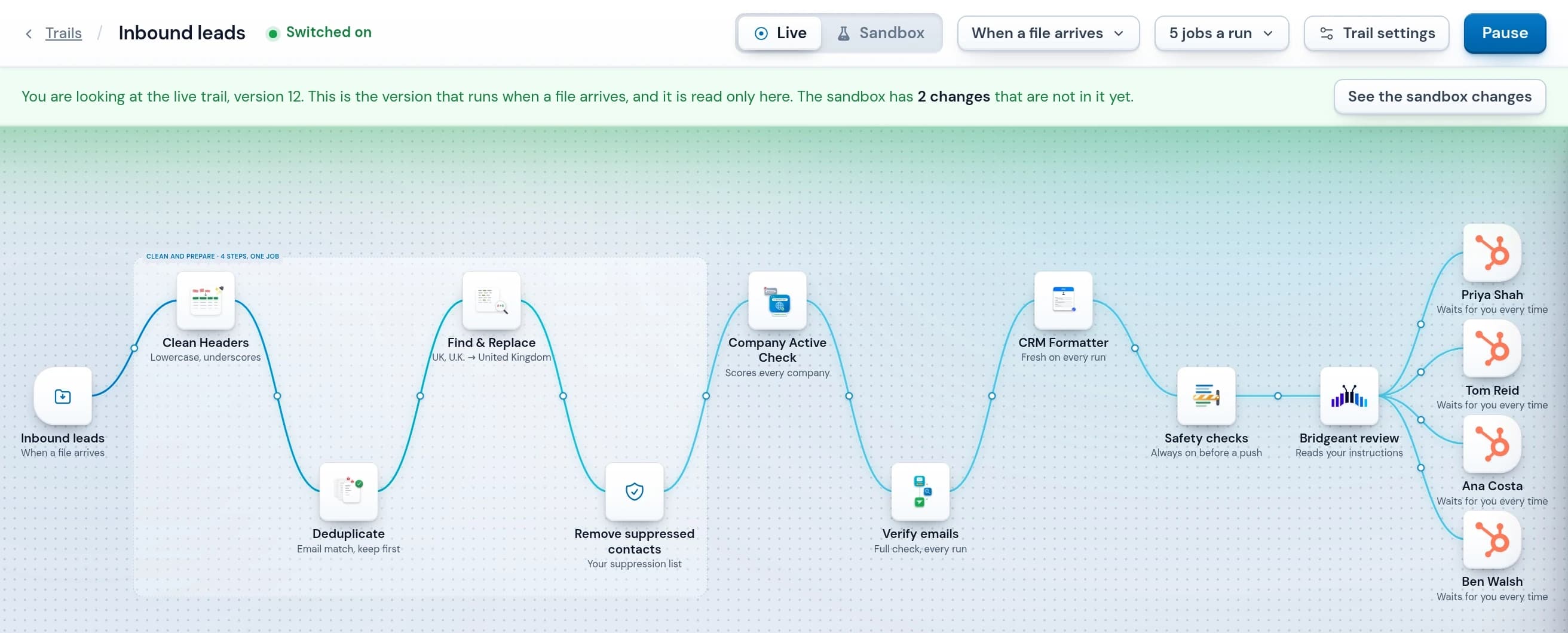
It's the architecture above, in one place, without the token bill.
Questions
What is lead automation?
Lead automation is the automated flow of lead data into a CRM without anyone importing it by hand. A list arrives from a data provider, a form fill or an export, it is cleaned and formatted on the way, and it lands in the CRM as records a sales team can work.
Does automating lead flow create duplicate records?
It does when several data sources feed the same workflow and nothing matches across them. Each provider formats a company name slightly differently, so the same company arrives two or three times and each copy brings its own contacts. The fix is matching across the sources before anything reaches the CRM, on the company name and on the rest of the row.
Should you deduplicate before or after merging your data sources?
After. Duplicate checking works inside one table, so the sources have to be combined first. Deduplicating each provider's file on its own returns every file clean, because each file only contained the company once. The duplicates exist between the files, not inside them.
Can AI clean lead data automatically?
AI is good at the decisions a rule cannot make, such as which of two conflicting values for the same company is the right one. It is the wrong tool for decisions that do have a definite answer, like whether two rows share an email address, where a rule is faster, cheaper and repeatable. A workflow that uses both handles far more without a person than either does alone.
Why does building lead automation yourself get expensive?
The AI step is what makes the cost move, because a model is billed by how much you put in front of it, so asking it about every row makes a month with three big lists in it cost three times a quiet one. The workflow builder bills on usage as well, though how steeply depends on whether it charges for every action or for each run of the whole workflow.
Written by

Daniel Pank, Founder
He spent seven years leading commercial and operations teams at a B2B outbound agency, running prospecting programmes for enterprise sales teams and building the systems underneath them, including an in-house CRM and a sales data consultancy. Operelio comes from years of working with data providers, and watching good data leave one and land in a CRM in worse shape than it left.